
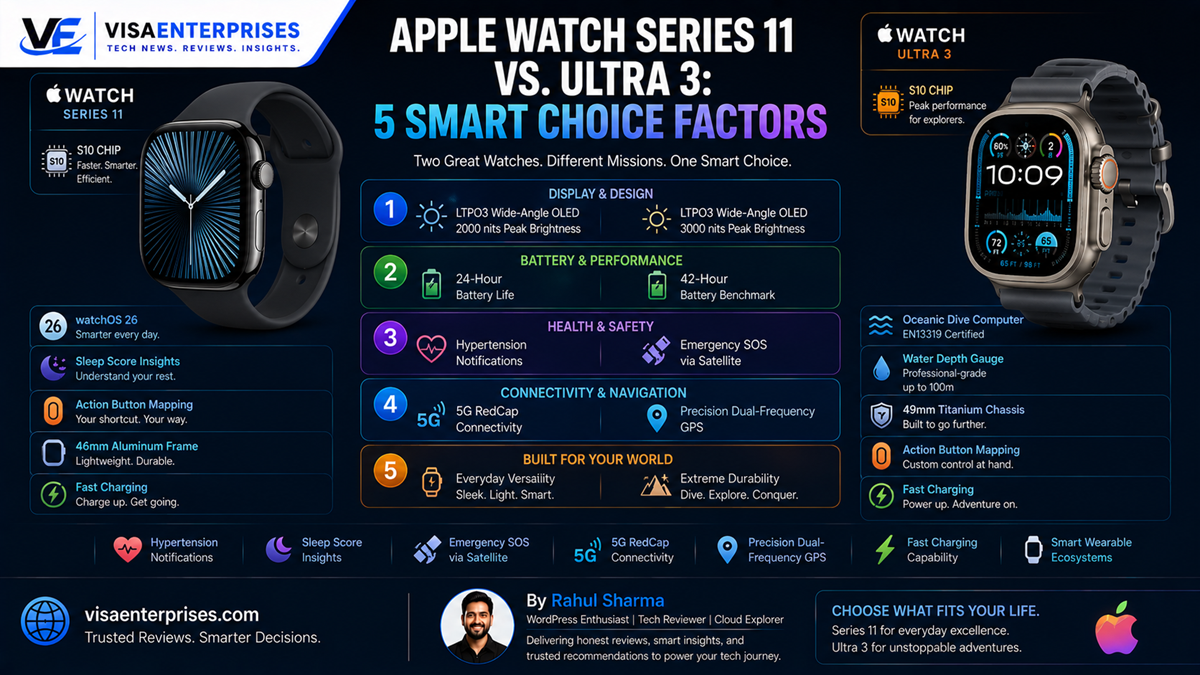
The choice between the Apple Watch Series 11 and the Apple Watch Ultra 3 balances form factor comfort with intense activity demands. Both devices share the powerful Apple S10 processing chip, watchOS 26 capabilities, and medical-grade tracking features like hypertension notifications and sleep score sheets. However, the Apple Watch Series 11 focuses heavily on daily lifestyle wear, offering a remarkably thin 9.7mm unibody design and an upgraded 24-hour baseline battery lifespan. Conversely, the Apple Watch Ultra 3 is built for extreme adventure, featuring a rugged 49mm titanium chassis, an ultra-bright 3000-nit screen, precision dual-frequency GPS, a customizable Action button, and standalone Emergency SOS via satellite connectivity.
Introduction
The premium wearable landscape has evolved into two distinct philosophies. For a long time, selecting a high-performance smartwatch was a straightforward matter of picking the correct sizing band. Every device within a brand’s main generation lineup carried near-identical internal components, battery expectations, and tracking limits, with pricing scaling simply based on your choice of case metals or leather bands.
That standardized approach has vanished. The release of Apple’s latest hardware lineup presents buyers with a fascinating choice.
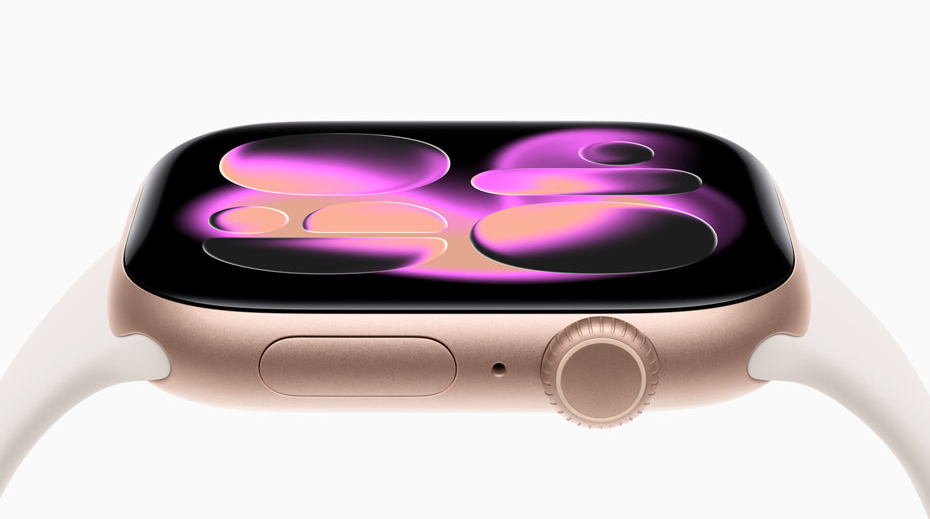
By conducting a rigorous evaluation of the Apple Watch Series 11 alongside the heavy-duty Apple Watch Ultra 3, this guide analyzes how divergent design choices change daily usability. From structural case footprints and battery curves to standalone satellite communication channels and outdoor tracking, we look at exactly how these devices perform across everyday routines and extreme conditions alike.
Core Hardware and Display Dynamics Compared
Evaluating the Apple Watch Series 11 requires tracking how Apple has optimized its traditional chassis to maximize screen real estate. The Series 11 refines its classic unibody profile, landing at a remarkably thin 9.7mm depth that slips effortlessly under professional dress shirts. Available in 42mm and 46mm sizing variants, it updates its aluminum models to feature an Ion-X front glass that provides two times better scratch resistance than past generations.
The Apple Watch Ultra 3 rejects this compact approach, opting instead for a massive, military-grade 49mm titanium tank build measuring a substantial 12mm deep.
[Apple Watch Series 11] ──> 9.7mm Thin Profile ──> 2000 Nits ──> 24-Hour Battery Lifecycle
[Apple Watch Ultra 3]   ──> 12.0mm Heavy Tank   ──> 3000 Nits ──> 42-Hour Endurance Ramping
Visual Output Boundaries under Sunlight
Both systems employ advanced LTPO3 wide-angle OLED display layers engineered to remain perfectly legible at sharp angles. However, their peak illumination thresholds match their intended environments:
- The Apple Watch Series 11: Climbs to a bright 2,000 nits of peak luminance, dropping smoothly down to a single nit in dark spaces to preserve eye comfort.
- The Apple Watch Ultra 3: Rockets up to an incredible 3,000 nits of peak output, using a flat sapphire crystal shield to easily combat blinding glare during mountain ascents or desert excursions.
Unified S10 Silicon Performance
Beneath their distinct visual frameworks, both wearables run on identical computing foundations: the Apple S10 chip bundled with a dedicated 4-core Neural Engine and a spacious 64GB local flash drive. Interface responses, layout animations, and localized Siri processing loops operate with identical speed across both form factors, ensuring you never face system lag when navigating your apps.
Health Insights and safety Feature Expansion
Where the platform truly excels is in its suite of advanced medical monitoring tools. Both models introduce groundbreaking health tracking features, including automated hypertension alerts that run in the background to spot early signs of high blood pressure, and a comprehensive Sleep Score sheet that monitors your nightly rest quality.
The Adventure Safety Gap
While health monitoring is identical, their emergency safety frameworks diverge significantly:
- Series 11 Safety Net: Relies entirely on traditional cellular networks and nearby iPhone handoffs to route standard Crash Detection and Emergency SOS alerts.
- Ultra 3 Emergency Stack: Integrates standalone Emergency SOS via satellite connectivity. This satellite array allows outdoor explorers to text emergency response networks and share their location data via Find My when traveling completely off the grid.

Specialized Athletic Tracking Engines
For aquatic athletes, the Ultra 3 functions as a fully certified EN13319 dive computer capable of managing recreational scuba diving down to 40 meters. It features a loud 86-decibel emergency siren and accurate dual-frequency GPS (L1 + L5) to map precise running routes through dense high-rise cities.
The Apple Watch Series 11 handles standard lap swimming and snorkeling beautifully down to 6 meters with its built-in depth gauge, but cuts out heavy-duty diving features to preserve its ultra-slim profile.
Step-by-Step Optimization for watchOS 26
To maximize the processing efficiency, app responsiveness, and overall battery lifespans of your Apple Watch Series 11 hardware, configure these essential system adjustments.
1. Initialize the Advanced Hypertension Alert Suite
Set up your background cardiovascular sensing tools to monitor your vascular trends safely.
- Launch the core Health App on your paired Apple iPhone.
- Tap the Browse tab in the lower right quadrant and open the Heart category.
- Locate the Hypertension Notifications setup wizard.
- Complete the user profile questionnaire, inputs baseline verification data, and enable the background analysis toggle to allow your watch to flag unusual trends.
2. Configure Dynamic Gesture Controls
Set up your motion sensors to handle notification cards hands-free when your other hand is busy.
- Open the Settings App directly on your watch screen.
- Scroll down and select the Gestures configuration tab.
- Tap into the Double Tap options row and select your preferred action (such as pausing media or answering an inbound call).
- Verify that the Wrist Flick gesture is turned on to easily dismiss incoming alert pop-ups with a quick turn of your arm.
3. Initialize Low Power Mode Battery Saving Profiles
Extend your daily battery runtime comfortably when moving through long travel weekends away from power lines.
- Swipe up from the bottom of your home interface to open the system Control Center.
- Tap the active battery percentage indicator icon to open the power sub-menu.
- Scroll past the standard duration readouts and enable the Low Power Mode toggle.
- Note: This setting safely turns off the Always-On screen and background heart rate scans, extending the Apple Watch Series 11 battery lifecycle up to 38 hours.
Common Mistakes to Avoid when Choosing an Apple Watch
Selecting the ideal high-end wearable requires matching its physical properties with your actual lifestyle habits.
Buying the Massive 49mm Ultra Case for Petite Wrists
Choosing the Ultra 3 purely for its long battery specifications without trying on its 49mm titanium frame can lead to discomfort if you have smaller wrists. The thick, 61-gram chassis can feel cumbersome during sleep tracking sessions and can catch on tight jacket sleeves. If your daily routine centers on office productivity, running, and gym workouts, the lighter 37-gram, 46mm aluminum case of the Series 11 offers a much more comfortable, natural fit.
Forgetting to Use Fast Chargers for Quick Top-Ups
Both next-generation wearables introduce significantly faster charging curves, but unlocking these speeds requires pairing your charging cord with an appropriate wall block. Connecting the included magnetic fast-charging puck to an old 5W USB wall adapter will result in slow charging times. Always plug your cord into a certified USB-C Power Delivery (PD) wall adapter rated for 20W or higher to hit the target of an 80% charge in just 30 minutes.
Straining the Touch Screen Surface during Rugged Construction Tasks
While the polished titanium casing and sapphire crystal display of the premium Series 11 models offer exceptional durability, the baseline aluminum models utilize Ion-X front glass. Although this glass features a new ceramic coating that makes it two times more scratch-resistant than previous generations, it can still scratch if scraped against rough concrete walls or iron gym weights. Pair your aluminum model with a slim bumper case during heavy physical labor to keep it looking pristine.
Smart Watch Architecture Comparison Table
The comparison matrix below highlights the direct performance specifications across both premier watch configurations.
| Wearable Characteristic | Apple Watch Series 11 (46mm) | Apple Watch Ultra 3 Flagship |
| Chassis Build Metal | Aluminum or Polished Titanium | Aerospace-Grade Grade 5 Titanium |
| Physical Case Sizing | 42mm or 46mm Case Height | Fixed 49mm Rugged Frame |
| Max Display Luminance | Up to 2,000 Nits Peak | Up to 3,000 Nits Peak (1Hz) |
| Processor Generation | Apple S10 System Architecture | Apple S10 System Architecture |
| Battery Life (Normal Use) | Up to 24 Hours Continuous | Up to 42 Hours Continuous |
| Location Tracking Tech | Standard Single-Band GPS | Precision Dual-Frequency GPS |
| Sub-Surface Dive Bounds | Depth Gauge Rating to 6 Meters | EN13319 Dive Certification to 40 Meters |
| Emergency Safety Network | Standard Terrestrial Cellular SOS | Standalone Satellite SOS Messaging |
Pros and Cons of the Main Generation Lineup
Pros
- Ultra-Slim Everyday Comfort: The thin 9.7mm frame sits light and flat on the wrist, making it exceptionally comfortable for all-day wear and sleep tracking.
- Massive Battery Leap: Pushes its baseline runtime up to 24 hours, completely eliminating low-battery anxiety during long days.
- Excellent Wide-Angle Display: The LTPO3 OLED display panel ensures vibrant clarity and crisp text layout visibility from any angle.
- Advanced Medical Metrics: Native background support for hypertension detection and sleep score sheets provides top-tier health monitoring.
- Rapid Charging Recoveries: Quick charging speeds restore up to eight hours of typical battery life in just 15 minutes of charging time.
Cons
- No Satellite Safety Grid: Lacks the standalone satellite antenna module found on the rugged Ultra series.
- Fewer Physical Input Keys: Omits the customizable physical Action button, requiring you to handle all inputs via the touch screen and Digital Crown.
Frequently Asked Questions
What are the main upgrades on the Apple Watch Series 11?
The watch introduces a refined 9.7mm thin profile, an upgraded 24-hour battery lifecycle, a display that is two times more scratch-resistant, on-device Siri, and advanced hypertension notifications.
How does the Apple Watch Series 11 battery life compare to older models?
The watch delivers up to 24 hours of normal use on a single charge—a massive six-hour leap over the 18-hour limits of the older Series 10 generation.
Can the Apple Watch Series 11 connect to emergency satellites?
No. Independent Emergency SOS via satellite connectivity is an exclusive feature of the rugged Ultra 3 platform, which houses specialized satellite antenna components.
Is the S10 processor faster inside the Ultra 3 than the Series 11?
No. Both premium wearables utilize the identical Apple S10 system architecture and a 4-core Neural Engine, yielding identical speeds for apps and operating system tools.
What sizing options are available for the Apple Watch Series 11?
The refined unibody case is manufactured in two primary sizing variants: a compact 42mm size for smaller wrists and an expanded 46mm size that maximizes display area.
Can I track my scuba diving sessions with the Series 11?
The Series 11 includes a depth gauge rated for shallow swimming and snorkeling down to 6 meters. However, deep recreational scuba diving down to 40 meters requires the EN13319-certified Ultra 3.
What is the advantage of the new Ion-X display glass?
The aluminum models feature an updated Ion-X front glass enhanced with a durable ceramic coating, making the display panel two times more scratch-resistant than previous generations.
How fast does the fast-charging feature work on the Series 11?
When connected to an appropriate fast charger, the device can charge from 0% up to 80% capacity in approximately 30 minutes, while a brief 5-minute charge provides a full 8 hours of sleep tracking.
Does the Apple Watch Series 11 support blood oxygen tracking?
Yes. The hardware includes a fully functional blood oxygen sensor grid, with sensor measurements viewable inside the companion Health application on your paired iPhone.
What color variants are available for the aluminum case models?
The aluminum case models are manufactured in four distinct color finishes: a brilliant Jet Black, a warm Rose Gold, a traditional classic Silver, and an all-new Space Gray.
Final Verdict
Evaluating the Apple Watch Series 11 alongside the rugged Ultra 3 showcases Apple’s clear commitment to serving distinct user lifestyles. By engineering a remarkably thin unibody frame while boosting its baseline battery runtime to a full 24 hours, the company has delivered an exceptional everyday smartwatch. The inclusion of the fast S10 chip and advanced health features like hypertension alerts ensures it handles daily tasks with complete confidence.
While extreme outdoor adventurers and diving enthusiasts will certainly benefit from the heavy-duty titanium shell and satellite safety tools of the Ultra 3, the Apple Watch Series 11 remains the definitive choice for the vast majority of users. Its elegant profile, fast-charging recovery speeds, and accessible entry pricing make it a highly practical, future-proof wearable that handles daily connectivity, fitness tracking, and health monitoring with effortless style.
Technical Resources and References
Internal Links
For a deeper dive into our architectural components, view our related breakdowns:
External References
Review official press releases and technical device specifications directly from primary computing authorities:
- Apple Newsroom Introduction Hub: https://www.apple.com/newsroom/2025/09/apple-introduces-apple-watch-series-11/
- Apple Support Component Specs: https://support.apple.com/en-in/125093
- MacRumors Buyer’s Guidance Summary: https://www.macrumors.com/roundup/apple-watch/

- 5 Smart Ecosystems: Best Smart Home Devices for Seamless Flow - June 2, 2026
- 10 Smart Choices: Top AI Productivity Tools for Workday Success - June 2, 2026
- 5 Smart Choices: Best Budget Smartwatch Models for Hitting Goals - June 2, 2026