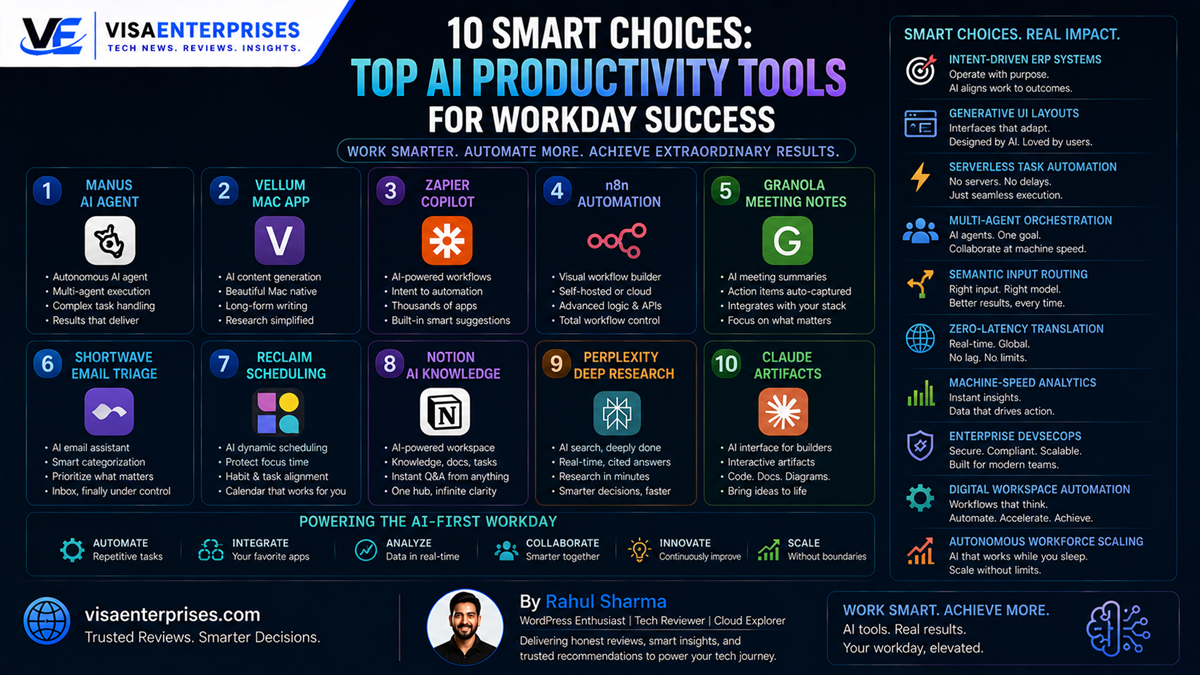
The top AI productivity tools are shifting from simple, single-prompt chat windows to highly advanced, intent-driven software agents that automate complex multi-step tasks. Instead of requiring you to manually click through separate web pages or code individual connection blocks, these next-generation applications read your natural language intent to execute entire projects on your behalf. For full end-to-end task execution across the web, the groundbreaking Manus AI leads the category, while Vellum serves as an exceptional localized personal memory hub for Mac power users, and Zapier Copilot remains the gold standard for connecting corporate applications smoothly.
Introduction
The modern corporate workforce has hit a wall with traditional software utilities. For nearly a decade, managing a digital office workspace meant acting as a manual data handler. Professionals spent hours copying lead details into customer databases, writing repetitive follow-up emails, sitting through long overview meetings to pull out action steps, and bouncing between fragmented project dashboards. This heavy administrative burden left teams stuck with empty busywork, draining energy away from high-value creative thinking and strategic planning.
That rigid operational blueprint is officially shattering. The release of advanced reasoning models has introduced a new class of top AI productivity tools.
Rather than acting as simple calculators that wait for line-by-line instructions, modern tools use advanced “Generative UI” configurations and multi-agent frameworks to understand your overall goals. Express a simple intent like “Build an outreach campaign for my highest-value leads,” and these systems will map out the steps, gather the required data, and draft the text entirely on their own. This comprehensive guide reviews 10 outstanding apps setting the new standard for workday automation.
The Shift to Intent-Driven Agent Platforms
Understanding why these applications dominate current lists of the top AI productivity tools requires looking at how software design has evolved. Traditional automation platforms rely on hardcoded, trigger-action logic. If a specific event happens in App A, move that text over to App B. While this rule-based setup handles simple data routing well, it breaks down completely the moment an app’s layout changes or a task requires human-like judgment.
Next-generation software agents eliminate these rigid limitations by layering an active, self-correcting intelligence loop over your standard business tools.
[Traditional Automation] ──> Rigid Trigger ──> Fixed Hardcoded Step ──> Fails on Dynamic Layout Changes
[Intent-Driven Agent]    ──> Natural Intent ──> Semantic Reason & Tool Selection ──> Successful Autonomous Execution
End-to-End Task Completion Engines
Elite systems like Manus move past standard conversational text generation by employing specialized browser operators. These software agents can visually navigate the live internet just like a human engineer—opening tabs, searching databases, reading profiles, and filling out web forms safely under your oversight. This allows you to hand off entire afternoon projects, like conducting deep candidate sourcing loops or compiling extensive market research, to an automated helper.
Secure Localized Personal Workspaces
At the individual workflow layer, tools like Vellum alter how professionals interact with their local systems. Operating as a native Mac application, it creates a secure, private memory index that connects your local documents, work emails, and slack conversations together. Because it uses semantic search patterns to understand context, you can locate files or pull project updates instantly without ever sorting through messy nested folders.
The Top 10 AI Productivity Tools Reviewed
Navigating the cutting-edge marketplace requires matching specific software setups with your daily office bottlenecks. The current elite tier focuses heavily on breaking down information walls and automating tedious data tasks.
1. Manus: The Ultimate Autonomous Browser Agent
Manus stands out as a massive evolutionary step for the top AI productivity tools ecosystem by operating as a fully functional digital teammate. Instead of just answering text prompts, it uses an advanced browser operator to take real-world actions across the web.
Give it a complex instruction, like “Find the top 10 marketing leads in Mumbai on LinkedIn and draft tailored email outreach templates for each,” and Manus will handle the research, verify the profiles, and organize the data into a clean sheet entirely on its own.
2. Vellum: Your Private Personal Memory Vault
For professionals who want a fast assistant that belongs entirely to them, Vellum offers a stellar local solution. Running natively on your local machine, it unifies your emails, task calendars, and team chat channels into a single, secure memory layer.
You can ask it complex contextual questions about previous conversations, and it will pull up the exact details instantly, making it an indispensable tool for high-volume information management.
3. Zapier Copilot: Seamless Corporate Application Sync
Zapier continues to lead the enterprise event-driven automation space by adding a conversational natural language builder to its platform.
Zapier Copilot allows non-technical business leads to build complex multi-app connections simply by describing what they want to happen in plain English. The built-in engine automatically maps your data channels, configures your webhooks, and tests every step to ensure your data flows smoothly.
Top 10 AI Productivity Tools Comparison Table
The comparison matrix below highlights the direct performance capabilities, starting price tiers, and primary operational use cases for the year’s leading automation tools.
| Premium AI Productivity Tool | Core Operational Category | Starting Monthly Price | Best Tailored For | Primary Structural Strength |
| Manus | Autonomous AI Agent | ~$20 / Month | Complete Multi-Step Web Tasks | Advanced Browser Operator Actions |
| Vellum | Personal Memory Hub | Open-Source Base | Localized Desktop Automation | Unified Cross-Surface Local Memory |
| Zapier Copilot | Workflow Automation | ~$30 / Month | Connecting Corporate SaaS Apps | Massive 8,000+ Connection Catalog |
| Granola | Meeting Productivity | Free Tier Available | Semantic Meeting Notes | Action Item Extraction Loops |
| Shortwave | Intelligent Email | ~$9 / Month | High-Volume Inbox Triage | Deep Context Conversation Threading |
| Reclaim | Smart Scheduling | Free Tier Available | Dynamic Time Blocking | Balancing Focus Windows Automatically |
| Notion AI | Knowledge Management | ~$10 App Add-On | Document Context Summaries | Native Inline Content Editing |
| Perplexity | Deep Web Research | Free Tier Available | Real-Time Sourced Answers | Clear Interactive Sourced Reporting |
| Claude Pro | Text & Project Coding | ~$20 / Month | Large Document File Reviews | Artifact Live Preview Interfaces |
| Lovable | App & Web Building | ~$25 / Month | Low-Code Software Generation | Live Project File Diff Reviews |
Step-by-Step Optimization for Automated Workdays
To maximize your processing speed, data precision, and battery health when deploying the top AI productivity tools across your corporate workspace, configure these key preferences.
1. Initialize the Local Personal Knowledge Base
Set up your local system storage to build a secure, private memory index across your active project folders.
- Launch your native Vellum Desktop Application interface.
- Navigate to the Storage Connections setting panel.
- Select your primary system data directories, active project folders, and local text documents.
- Enable the background scanning scheduler to allow the system vector engine to build a secure, local database layout of your work files without uploading documents to external public cloud networks.
2. Configure Your Conversational SaaS Automation Loops
Set up your cross-app data routing pipelines using simple, natural language design descriptions.
- Open your Zapier Workspace Dashboard and click into the Copilot Builder tab.
- Type a clear, intent-driven instruction into the conversational input window:
Summarize incoming enterprise customer feedback emails using local language models, log the data metrics into our main tracking table, and send an action item ping to our core team channel in Slack.
- Review the visual node tree generated by the engine, connect your verified account access keys, and run the automated test routine to confirm data flows perfectly before pushing the workflow live.
3. Set Up Automated Meeting Note Triage Rules
Configure your meeting audio transcription assistants to capture and organize key action items automatically during team sync calls.
- Launch your Granola Client Application before entering a video conference.
- Connect the audio input source to capture your system output or microphone feed directly.
- Turn on the Semantic Extraction Toggle to let the engine filter out routine casual chatter and compile highly focused, executive action steps straight into your text editor.
4. Activate Intelligent Time Blocking Schedules
Configure your smart calendar tools to protect your deep focus windows from getting broken up by unexpected meeting invites.
- Connect your primary business calendars directly to the Reclaim Scheduling Portal.
- Open the Focus Time Habit optimization template.
- Map out your preferred weekly boundaries, specifying that you want a minimum of two hours of uninterrupted focus time blocks daily.
- The smart scheduling system will automatically shuffle internal catch-up requests and adjust calendar invites in real time to keep your focus blocks protected.
Common Pitfalls to Avoid with AI Productivity Tools
Successfully moving your workflows over to these next-generation automation tools requires understanding their operational limits and boundaries.
Running Unverified Automated Scripts Directly Into Production Databases
Attempting to deploy fully autonomous software agents to modify live corporate databases or message sensitive client accounts without a Human-in-the-Loop (HITL) approval block is highly risky. Subtle reasoning errors or data misinterpretations can cause the system to overwrite database rows or share inaccurate info. Always configure clear approval steps so an experienced engineer must manually review and sign off on any major change.
Using Generic Large Language Models for Specialized Deep Research
Relying entirely on general-purpose, vanilla chat models to conduct deep, data-heavy competitive analyses or legal case background sweeps can lead to incomplete results. Simple chatbots lack access to real-time search indicators and publisher databases. Always leverage specialized research engines like Perplexity or Gemini Deep Research, which cross-reference active web indices and display clear citations for every data point.
Fragmenting Workspace Data Across Multiple Overlapping Tools
Installing a dozen separate, single-purpose productivity extensions can clutter your workspace and create data silos. If your meeting tracker, task manager, notes app, and email assistant all maintain separate, disconnected data indexes, your automation loops will eventually produce conflicting information. Prioritize building a tight, integrated stack centered around flexible hubs like Notion AI or Zapier Tables to keep your data aligned.
Pros and Cons of an Automated Workday Architecture
Pros
- Drastic Time Savings: Automates time-consuming data handling and administrative tasks, saving hours of weekly busywork.
- Proactive Assistant Support: Context-aware tools actively suggest smart shortcuts, calendar blocks, and reply drafts before you ask.
- Data-Grounded Decisions: Fusing local documents with smart research engines ensures your summaries and reports remain highly accurate.
- Accessible Low-Code Building: Natural language prompts allow anyone on the team to generate custom software connections and web interfaces easily.
Cons
- Initial Setup Time Investment: Configuring customized personal memory bases and cross-app connection keys requires some upfront planning.
- Model Token Execution Costs: Shifting heavy, high-volume batch automation tasks across premium API structures adds to monthly software budgets.
Frequently Asked Questions
What features define the top AI productivity tools?
The best current options are characterized by their ability to understand natural user intent, run multi-step actions autonomously across different apps, and utilize local context memory to avoid generic outputs.
How does Manus differ from standard AI chatbots like ChatGPT?
While standard chatbots excel at text conversation within a closed tab, Manus includes an advanced browser operator that lets it visually surf the live web, click buttons, and execute entire multi-step tasks on your behalf.
Are these productivity tools safe to use with sensitive corporate data?
Top platforms prioritize data security by using advanced encryption protocols, offering open-source self-hosted deployment choices like n8n, or processing files completely locally within secure desktop app sandboxes.
Can non-technical users build complex application integrations?
Yes. Next-generation workflow managers integrate conversational assistants like Zapier Copilot, allowing any business user to build resilient app-to-app connections simply by writing a description in plain English.
How do smart scheduling tools prevent calendar burnout?
Tools like Reclaim use context-aware algorithms to analyze your workload, automatically protecting focus blocks, adjusting tasks dynamically as deadlines shift, and rearranging internal meetings to keep your day organized.
Do these automated tools require massive internet bandwidth?
While research engines rely on stable web access to parse live links, localized personal assistants process document searches and script tracking loops completely offline on your device’s internal processor.
What is the role of a “Generative UI” experience in modern software?
Generative UI allows an assistant to build custom data tables, layout designs, and interactive charts on the fly to fit your exact request perfectly, removing the need to navigate between multiple separate apps.
How can teams verify that an autonomous agent isn’t outputting errors?
Organizations use strict Human-in-the-Loop (HITL) checkstops, which require the automated system to pause and present a clear preview diff log for human approval before applying changes to live databases.
Can text creation platforms maintain a specific brand voice?
Yes. Specialized marketing platforms like Jasper AI allow teams to upload existing brand guidelines and style assets, ensuring the system outputs consistent tone across all blog posts, emails, and social media updates.
What is the best way to start automating a messy workday?
Start small by identifying your single biggest time-waster, like meeting transcription or email cleanup. Deploy a targeted tool like Granola or Shortwave first, then gradually scale up your automation loops as your team gets comfortable.
Final Verdict
Adopting the top AI productivity tools into your daily loop completely changes how you manage your professional time. By moving past rigid trigger-action templates and letting intelligent, intent-driven applications handle repetitive busywork, you can free up hours of your day. This automation shift lets you step away from manual data management and focus entirely on high-value creative strategy and business growth.
For absolute freedom when handling complex, multi-step web research projects, choose the groundbreaking capabilities of Manus. If you require a secure, private assistant that unifies your workspace data completely offline on your desktop, opt for Vellum. Whichever application lines up with your daily workflow, moving to an intent-driven tool stack provides a spacious, highly reliable digital teammate built to help you conquer your workday.
Technical Resources and References
Internal Links
For a deeper dive into our architectural components, view our related breakdowns:
External References
Review official software manuals and technical product breakdowns directly from leading deployment platforms:
- Zapier Automation Engineering Blog: https://zapier.com/blog/ai-productivity-trends-2026/
- SAP Newsroom System Release Notes: https://news.sap.com/2026/01/intent-driven-enterprise-ux-architecture/
- DataCamp Productivity Automation Tracking: https://www.datacamp.com/blog/best-ai-tools-productivity-guide

- 5 Smart Ecosystems: Best Smart Home Devices for Seamless Flow - June 2, 2026
- 10 Smart Choices: Top AI Productivity Tools for Workday Success - June 2, 2026
- 5 Smart Choices: Best Budget Smartwatch Models for Hitting Goals - June 2, 2026