
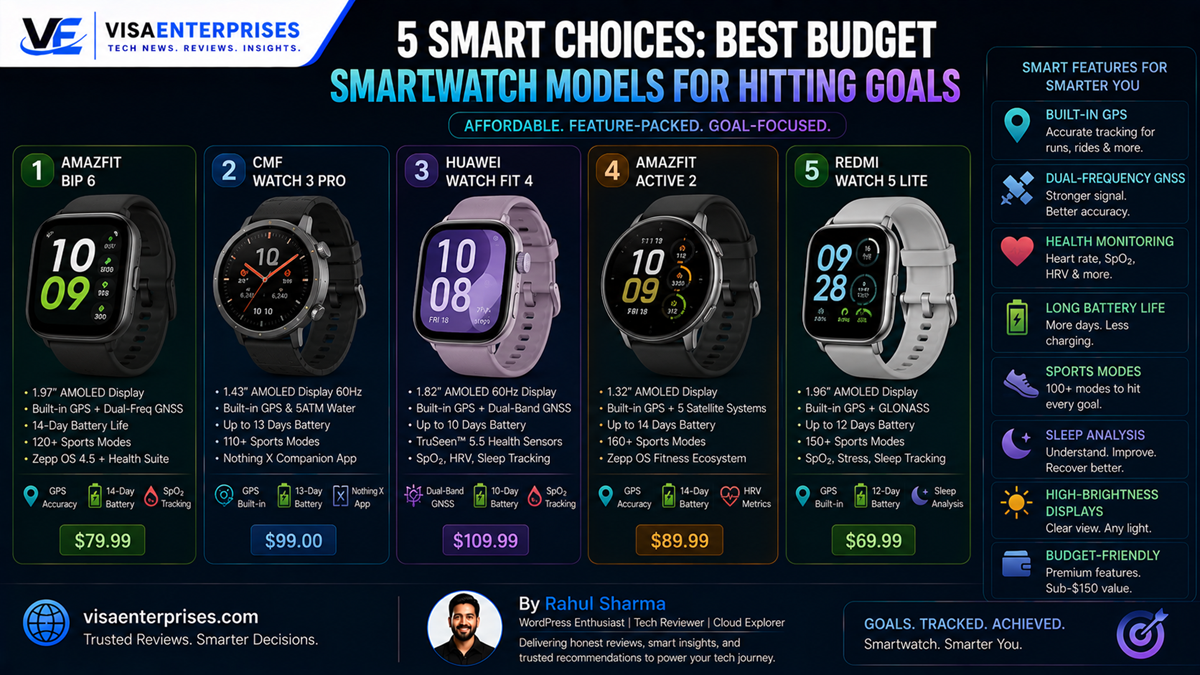
The best budget smartwatch models successfully challenge expensive premium wearables by combining bright, high-refresh AMOLED screens, built-in standalone GPS tracking, and multi-week battery lifespans. For users seeking the ultimate balance of detailed workout logging and everyday value, the Amazfit Bip 6 stands out as the top overall choice, delivering a spacious display and comprehensive sleep metrics for under $100. If design aesthetics are your priority, the CMF Watch 3 Pro (by Nothing) offers an incredibly polished interface and dual-frequency satellite tracking, while the Huawei Watch Fit 4 provides elite, coach-level sports tracking tools within an ultra-light aluminum frame.
Introduction
The affordable wearable marketplace has completely moved past the era of laggy, unrefined fitness bands. For a long time, purchasing a low-cost sports device meant accepting a frustrating series of technical compromises. Buyers were routinely stuck with tiny, washed-out LCD panels that were entirely unreadable outdoors, low-quality plastic frames that scratched easily, and companion apps filled with intrusive ads and erratic sensor dropouts. If you wanted highly accurate health metrics or standalone route tracing, you had no choice but to empty your pockets for high-end flagship devices.
That baseline infrastructure has fundamentally changed. Today, the sub-$150 landscape features highly optimized hardware configurations that deliver exceptional day-to-day functionality.
By using efficient, lightweight operating systems and advanced high-density battery arrays, value-focused manufacturers have dramatically elevated what an entry-level device can achieve. Whether your goal is to record long-distance running paths without carrying a heavy smartphone, monitor overnight respiratory patterns, or enjoy clean smartphone notification syncing, finding a highly capable best budget smartwatch that looks and feels upscale is entirely possible. This guide analyzes five standout devices rewriting the value rules.
Elite Affordable Fitness Trackers Reviewed
Selecting an optimized low-cost wearable means looking closely at sensor precision and real-world software performance. The top devices in this class skip heavy, power-hungry application storefronts to focus entirely on slick UI response speeds, continuous health tracking accuracy, and outstanding battery life.
[Mainstream $400 Watch] ──> Heavy Third-Party Apps ──> Continuous Network Sync ──> 1-2 Days Battery
[Best Budget Smartwatch] ──> Lightweight Native OS ──> Targeted Fitness Sensors ──> 7-14 Days Battery
1. Amazfit Bip 6: The Definitive Value Standard
Amazfit continues to dominate the entry-level space by packing premium display metrics into accessible price brackets. The Bip 6 sets a stellar benchmark, carrying a massive 1.97-inch AMOLED screen that outputs rich color saturation and high brightness to combat blinding outdoor glare.
Equipped with built-in standalone GPS, localized skin temperature sensing, and an impressive 14-day battery life, it handles multi-day travel and intensive workout logging without ever showing low-battery warnings.
2. CMF Watch 3 Pro: Minimalist Design Masterclass
Nothing’s specialized value sub-brand brings exceptional industrial design and distinct character to the budget tier. The CMF Watch 3 Pro strips away cheap-feeling glossy plastics, opting instead for a refined metallic unibody chassis paired with its signature monochrome software layout.
The headline feature inside this affordable frame is dual-frequency GNSS tracking, allowing the watch to hook onto multiple satellite arrays simultaneously to deliver pristine running maps that challenge watches three times its price.
3. Huawei Watch Fit 4: Professional Sports Coaching
For athletes who want deeper training insights, Huawei provides a gorgeous rectangular design that punches well above its price tag. The Watch Fit 4 wraps an immersive 1.82-inch AMOLED display in a lightweight, soft-touch aluminum case.
Its standout feature is its highly accurate sports tracking algorithm stack, which measures specialized metric trends like training load, running indices, and heart rate variability to act as an active, on-wrist athletic coach.
Technical Performance and Display Upgrades
Flipping through the menus on the best budget smartwatch options reveals incredibly responsive user interfaces. Value brands have completely eliminated interface stuttering by moving away from heavy, unoptimized software blocks and choosing streamlined, fitness-first operating systems like Zepp OS and Nothing OS.
The AMOLED Screen Revolution
A major structural upgrade across modern budget devices is the complete abandonment of low-quality, dim LCD screens in favor of advanced AMOLED panels. These next-generation screens control every individual pixel independently. Turn on the built-in Always-On Display (AOD), and the screen can turn off dark pixels completely, keeping text legibility razor-sharp while saving precious battery capacity.
Standalone Satellite Navigation Tools
Historically, cheap watches lacked an internal GPS module, forcing you to keep your phone strapped to your arm to record workout paths. The best budget smartwatch entries resolve this operational issue by embedding dedicated, low-power GPS modems directly into the watch frame. You can leave your heavy smartphone safely at home; the watch connects to global satellite arrays independently to track your pace, distance, and routes flawlessly.
Step-by-Step Guide to Optimizing Budget Devices
To ensure your affordable fitness companion operates with maximum tracking accuracy and maintains its exceptional multi-day battery life, configure these key preferences within your companion application.
1. Streamline Inbound System Notification Feeds
Prevent unnecessary vibration cycles from wasting processing power and draining your battery cells prematurely.
- Open your paired smartphone and launch your watch’s companion app (such as the Zepp App or Nothing X app).
- Navigate to your Device Settings and click into the Notifications / Alerts directory.
- Tap the app notification manager row and toggle off non-essential social media alert syncing.
- Restrict active syncing strictly to core text messages, incoming calls, and vital calendar entries to clear out background system memory overhead.
2. Adjust Continuous Biometric Sensor Sweeps
Configure your health tracking modules to balance precise health statistics with smart power conservation.
- Open the Health Monitoring options menu inside your watch settings screen.
- Locate the Heart Rate Detection Frequency selection row.
- Change the default frequency from a continuous 1-minute sweep over to an Intelligent / 10-minute balance mapping.
- Adjust your blood oxygen (SpO2) and stress monitoring tools to run exclusively during sleep windows rather than tracking around the clock, instantly adding days of extra runtime to your battery life.
3. Set Up Responsive Raise-to-Wake Windows
Configure your screen activation paths to keep the display completely dark during movie blocks or sleep hours.
- Open the system Display and Brightness settings menu directly on your watch dial.
- Tap into the Raise-to-Wake / Gesture Activation parameters layout.
- Set a customized active schedule (for example, 7:00 AM to 10:00 PM) to align with your daily routine.
- This configuration prevents the high-brightness AMOLED panel from turning on accidentally during overnight sleep movements, saving battery capacity.
4. Calibrate Personal Step and Stride Baselines
Ensure your training analytics engine records your outdoor physical activity stats with absolute precision.
- Launch your watch companion mobile application and click into your User Profile page.
- Select the physical statistics row and input your accurate, current weight, height, and age data.
- Open the Advanced Workout Settings row and input your measured manual walking stride length.
- This data input lets the watch algorithms calculate your caloric burn and distance travel stats with incredible accuracy, even if you are tracking indoors on a standard gym treadmill.
Common Pitfalls to Avoid with Affordable Wearables
Getting the absolute best long-term value out of a budget smartphone companion requires understanding its structural design limitations.
Expecting Deep Third-Party App Store Ecosystems
It is important to understand that affordable devices under $150 keep their interfaces fast and their batteries long-lasting by using streamlined, lightweight operating systems. Attempting to install heavy, third-party standalone applications like Spotify, independent navigation tools, or interactive games directly onto the device will fail, as there is no full app store framework. Always view these devices as highly advanced fitness collectors and notification mirrors rather than standalone wrist computers.
Showering Natively in High-Temperature Steamy Bathrooms
While nearly all top-tier budget models feature impressive 5ATM water-resistance certificates that let you swim laps in a local pool down to 50 meters, those ratings apply exclusively to cold freshwater. Wearing your watch inside a piping-hot shower or steamy sauna can cause the protective silicone seals to expand, allowing micro-steam drops to sneak past the frame and permanently short out the main motherboard. Always leave your watch on the counter when showering.
Neglecting regular Sensor Glass Maintenance Routines
Allowing layers of dried sweat, body lotion, sunscreen, or dirt to build up over the optical heart rate sensor glass on the back of the watch will block the infrared sensor light paths. This skin barrier will lead to erratic, spiked pulse readings and throw off your sleep stage tracking scores. Get into the habit of wiping down the back of the watch casing with a soft, damp microfiber cloth after intense, high-movement workouts.
Top Budget Smartwatch Comparison Table
The comparison matrix below highlights the key technical performance boundaries and price entries across the best budget smartwatch options available right now.
| Budget Smartwatch Model | Primary Screen Tech | Standalone GPS Stack | Rated Battery Lifespan | Core Case Material | Base Market Pricing |
| Amazfit Bip 6 | 1.97-Inch AMOLED | Built-In (5-System) | Up to 14 Days Total | Durable Polycarbonate | ~$80 / ₹6,999 |
| CMF Watch 3 Pro | 1.96-Inch AMOLED | Dual-Frequency GNSS | Up to 13 Days Total | Premium Matte Alloy | ~$99 / ₹7,999 |
| Huawei Watch Fit 4 | 1.82-Inch AMOLED | Built-In (Single Band) | Up to 10 Days Natively | Soft-Touch Aluminum | ~$134 / ₹11,999 |
| Amazfit Active 2 | 1.75-Inch AMOLED | Built-In (Multi Band) | Up to 12 Days Total | Refined Metal Frame | ~$119 / ₹9,999 |
| Redmi Watch 5 Lite | 1.96-Inch AMOLED | Built-In Standalone | Up to 18 Days Natively | Polycarbonate Matrix | ~$55 / ₹4,999 |
Pros and Cons of Budget Smartwatches
Pros
- Stunning Financial Value: Delivers 90% of a high-end flagship phone companion’s workout functionality at a mere fraction of the financial investment.
- Incredible Battery Longevity: Efficient internal codes let you go over a week on a single charge, completely outperforming short-lived premium smartwatches.
- Gorgeous AMOLED Screens: The move to high-nit display layers ensures deep contrast balances and crystal-clear outdoor viewing.
- Phone-Free Location Tracking: Built-in GPS chips map running and cycling paths accurately without needing a phone nearby.
Cons
- No NFC Contactless Payments: Most options under $150 drop built-in tap-to-pay hardware loops to keep production costs low.
- No Advanced Cellular Options: These devices lack standalone eSIM functionality, meaning they must remain paired to your phone via Bluetooth to sync notifications.
Frequently Asked Questions
What features define the overall best budget smartwatch?
The top value options successfully pair a bright, high-contrast AMOLED screen with an entry price under $150, offering built-in standalone GPS tracking and an impressive battery life that lasts well over a week.
Can a budget smartwatch record fitness metrics without a phone?
Yes. Thanks to built-in standalone GPS modules, options like the Amazfit Bip 6 and CMF Watch 3 Pro record your precise running paths, distance metrics, and heart rate stats completely independently.
Are these affordable devices compatible with both iPhones and Androids?
Yes. Unlike ecosystem-locked flagships, modern budget smartwatches use universal companion applications to connect smoothly to both iOS and Android devices.
Why do budget smartwatches have much longer battery life than flagships?
They run on streamlined, fitness-first operating systems that lack power-heavy app stores and continuous background cellular searches, allowing them to stretch battery life for up to two weeks.
Can I answer incoming phone calls directly on a budget smartwatch?
Yes. Many top models under $150 feature built-in microphones and speakers, allowing you to answer calls over a stable Bluetooth connection when your phone is nearby.
How durable are the screens on affordable smartwatches?
While they miss out on expensive sapphire crystal, budget models protect their AMOLED panels using tempered 2.5D or 3D curved glass, which provides reliable scratch resistance against daily wear.
Do budget fitness watches track heart rate accuracy reliably?
Yes. Modern multi-path optical sensor arrays deliver highly accurate pulse readings during steady cardio workouts like running and cycling, though rapid high-intensity interval training (HIIT) sprints can occasionally cause brief tracking delays.
What is the advantage of dual-frequency GNSS tracking on a cheap watch?
Dual-frequency tracking allows a device like the CMF Watch 3 Pro to lock onto multiple satellite bands simultaneously, which prevents location drift and ensures accurate route mapping around tall city skyscrapers or deep tree canopies.
Can I track my swimming workouts with these budget watches?
Yes. Models carrying official 5ATM water-resistance ratings can easily handle swimming pool laps and open-water tracking down to a depth of 50 meters, though they should be kept out of hot showers.
What charger is needed to fast-charge a budget smartwatch?
Most affordable watches include a magnetic charging cable in the box that hooks to standard USB ports. Plugging it into a certified charging block can fully restore over a week of power in under an hour.
Final Verdict
Finding an exceptional option from among the best budget smartwatch entries no longer requires making massive functional compromises. By selecting highly optimized models that successfully combine bright AMOLED screens, standalone built-in GPS, and incredible battery lifespans, you can track your health goals with total confidence while keeping your budget perfectly intact.
For an unbeatable combination of an expansive display, detailed wellness metrics, and accessible pricing, choose the exceptional Amazfit Bip 6. If your daily style favors clean, minimalist design and precision dual-frequency route mapping, the CMF Watch 3 Pro is a phenomenal value-packed choice. Whichever device aligns with your fitness goals, moving to a modern mid-tier smartwatch gives you access to high-performance health tracking without the steep flagship cost.
Technical Resources and References
Internal Links
For a deeper dive into our architectural components, view our related breakdowns:
External References
Review official test reviews and technical platform metrics directly from trusted wearable authorities:
- Wareable Value Guides: https://www.wareable.com/smartwatches/best-cheap-smartwatch-7780
- PCMag Fitness Tracker Reviews: https://www.pcmag.com/picks/the-best-fitness-trackers
- Tech Advisor Affordable Overviews: https://www.techadvisor.com/article/723392/best-fitness-tracker-2.html

- 5 Smart Ecosystems: Best Smart Home Devices for Seamless Flow - June 2, 2026
- 10 Smart Choices: Top AI Productivity Tools for Workday Success - June 2, 2026
- 5 Smart Choices: Best Budget Smartwatch Models for Hitting Goals - June 2, 2026