
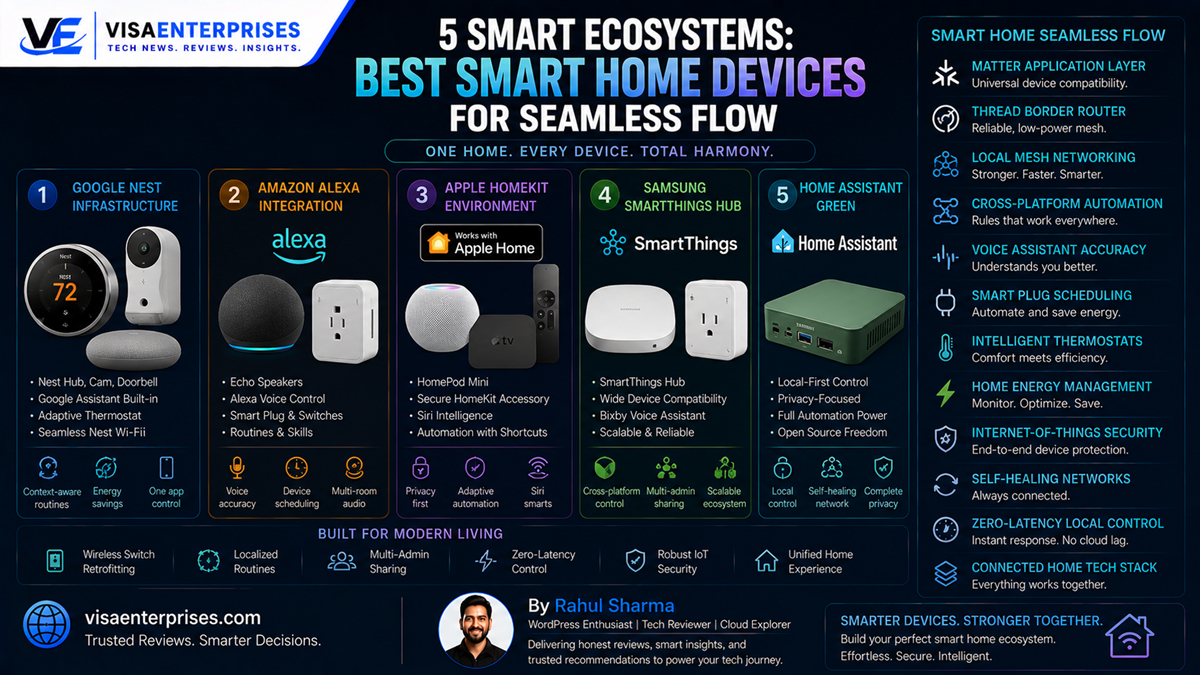
The best smart home ecosystems transform a fragmented collection of gadgets into a unified, self-healing automation network. To build a highly responsive setup, select a core platform that fully supports the updated Matter standard and uses a Thread Border Router for local data transfers. For unmatched voice accuracy and proactive assistance, Google Nest stands as the top overall ecosystem choice, especially with its newly rolled out Gemini 3.1 intelligence upgrade. If your primary goal is maximizing sheer product compatibility, Amazon Alexa leads the field, while Apple Home remains the gold standard for strict user privacy, and Home Assistant Green provides unparalleled local control for power users managing their smart home devices.
Introduction
Building an automated property used to feel like managing a complex corporate IT department. Homeowners who wanted to install basic connected accessories were forced to choose a single manufacturer silo early on, or deal with a confusing web of custom cloud-to-cloud software bridges. More frustratingly, these early configurations suffered from significant execution lag, data tracking concerns, and connection drops whenever the main house internet line experienced a brief stutter.
That era of platform lock-in is officially history. The smart home industry has settled into an era of universal standards.
Today, the market centers around open protocols that allow smart home devices from completely different brands to share data locally. Whether your objective is to lower your monthly utility costs through smart energy tracking, reinforce your perimeter with intelligent cameras, or build complex hands-free lighting rules, selecting the right underlying ecosystem is critical. This guide breaks down the five top platforms dominating connected living, analyzing their system architectures, local processing metrics, and daily automation capabilities.
The Protocols of Modern Automation: Matter and Thread
To understand why modern home systems operate with exceptional speed, you have to look directly at the underlying networking layers. Historically, smart products choked home Wi-Fi networks because every light bulb and plug maintained an independent connection to the central router, using up valuable wireless bandwidth.
The current landscape eliminates this bottleneck by splitting device communication into two complementary layers: Matter and Thread.
[Application Layer]  ──> Matter Standard (Defines the Universal Language)
[Networking Layer]   ──> Thread Mesh Network (Creates the Local Hardware Backbone)
Matter: The Universal Language Layer
Matter is a universal application-layer standard backed by Apple, Google, Amazon, and Samsung. It acts as a translation layer for your household hardware. If a product carries the universal Matter badge, it announces its presence using a standard data model. This means you can control your preferred smart home devices across multiple platforms, completely removing the old barriers between competing ecosystems.
Thread: The Self-Healing Hardware Mesh
While Matter handles the software communication, Thread forms the underlying local network backbone for low-power smart home devices like sensors, light switches, and door locks:
- Self-Healing Topologies: Thread accessories form a mini mesh network where powered nodes route data packets for nearby units. If a single hub drops offline, the surrounding items instantly reroute traffic to keep your automation schedules running.
- Border Routers: Hardware like the Nest Wifi Pro or Apple TV 4K acts as a Thread Border Router, bridging your local low-power mesh network to your main high-speed home network.
- Offline Execution Paths: Because Thread networks communicate directly across local hardware paths, your motion sensors can trigger your smart plugs instantly even if your main internet service goes down entirely.
The Top 5 Smart Home Ecosystems Reviewed
Choosing the perfect platform requires balancing how you interact with your electronics with your data privacy goals. The top systems on the market provide flexible control options, ranging from simple voice prompts to advanced, localized code dashboards.
1. Google Nest: The Proactive Intelligence Champion
Google has positioned its ecosystem as the absolute benchmark for predictive automation and natural voice tracking. Driven by the advanced Gemini 3.1 language architecture rolled out in the latest Spring update, Google Home assistants correctly answer head-to-head queries far more reliably than competing voice models.
The platform excels at context-aware background adjustments, allowing your smart home devices to react up to 40% faster. Furthermore, using native visual intelligence, Nest cameras can now act as triggers by understanding real-world visual events—letting you create automations simply by describing what the camera sees.
2. Amazon Alexa: Unrivaled Compatibility and Scale
For users who want to mix and match hardware without ever hitting a compatibility wall, Amazon’s ecosystem stands unmatched. Alexa connects smoothly to hundreds of thousands of third-party smart home devices, ranging from budget-friendly smart plugs to large smart appliances.
The intuitive Alexa app makes it incredibly simple to group different accessories together into single-phrase habits, like setting a “Good Night” routine that locks doors, cuts power to plugs, and dims color-changing LEDs simultaneously.
3. Apple Home: The Privacy and Security Standard
Apple brings its trademark closed-loop security focus directly into the automated property landscape. The Apple Home framework forces all connected hardware to complete strict local encryption requirements, ensuring that your live camera feeds and security status logs remain completely private.
The system relies entirely on on-site processing via an Apple HomePod or Apple TV 4K, meaning your personal lifestyle metrics are never uploaded to external advertising servers.
Step-by-Step Optimization for Connected Homes
To ensure your automated property runs with near-zero latency, maintains high wireless stability, and protects your data privacy, configure these essential system adjustments.
1. Initialize the Local Multi-Admin Access Layer
Take advantage of universal standards to share accessory access across multiple platform dashboards simultaneously without resetting your hardware.
- Open your primary controller application (for example, the Google Home App) on your smartphone.
- Tap the specific tile for a pre-configured Matter-certified device, like a smart lock or ambient light strip.
- Click the Settings Gear icon in the top right corner and select Linked Matter Apps & Services.
- Tap Share Device to generate a temporary pairing QR code. Launch a secondary app (like Apple Home) on a family member’s phone and scan the code to gain twin system control instantly.
2. Optimize Wireless Data Frequencies for Smart Products
Keep your high-bandwidth video streams separate from your smart home infrastructure to prevent local network traffic jams.
- Log into your main home wireless router’s administrator command panel using a desktop browser.
- Split your wireless broadcast paths into two distinct, dedicated frequency bands.
- Assign your primary computer setups and streaming sticks to the high-speed 5 GHz or 6 GHz channels.
- Connect all your standard Wi-Fi smart home devices exclusively to the long-range 2.4 GHz band, clearing out network congestion across your main entertainment channels.
3. Configure Local Automated Time-Blocking Habits
Set up conditional, context-aware schedules that run completely offline on your on-site controllers.
- Open your ecosystem’s automation canvas and select the Create New Routine option.
- Set a precise physical trigger event, like an environmental motion sensor registering movement between 11:00 PM and 6:00 AM.
- Map the conditional action to turn on a smart plug or pathway light at a dimmed 10% brightness level.
- Save the routine to your local Matter hub to ensure the action triggers instantly via local peer-to-peer data paths, even during external internet outages.
4. Activate Intelligent Home Energy Safeguards
Enable predictive automated settings to lower your standby energy consumption.
- Launch your ecosystem’s home energy management module, such as Samsung SmartThings Energy or Home Assistant Energy.
- Connect your platform to your smart electricity meter or active smart plugs.
- Turn on the Predictive Tariff Adjustments setting to allow the system to pause heavy energy draws, like EV charging or laundry cycles, during peak pricing hours, automatically shifting workloads to low-tariff periods.
Common Mistakes to Avoid with Smart Architecture
Building a responsive automated environment requires making informed decisions around your hardware layout and avoiding a few common pitfalls.
Mixing Legacy Closed Protocols Without a Central Bridge
Attempting to connect older, single-brand wireless accessories directly into a modern Matter over Thread ecosystem without a proper translation bridge can cause system lag and automation dropouts. Legacy protocols like Zigbee or Z-Wave cannot communicate directly with IP-based Matter networks. Always pair older hardware with a compatible bridge, like a Philips Hue Bridge, which translates older wireless signals into standard Matter data formats.
Relying Entirely on Cloud-Dependent Smart Outlets
Purchasing cheap, uncertified smart plugs that require a continuous connection to external manufacturer cloud servers to run basic timers can create significant liabilities. If the vendor’s servers experience a disruption or the company shuts down, your automated routines will fail instantly. Always prioritize buying local-first, Matter-certified hardware that processes commands on your own on-site hubs.
Plastering Smart Bulbs Behind Traditional Mechanical Wall Switches
Installing premium, color-changing smart light bulbs into sockets controlled by standard, mechanical wall switches can lead to regular connection drops. The moment a family member or guest manually flips the physical wall switch off, it cuts electrical current to the bulb completely. This forces the device off the network and breaks any automated lighting rules you’ve set up. Always install smart switch modules behind the wall plates or place lock covers over traditional switches to keep your bulbs powered and online.
Smart Home Ecosystem Architecture Comparison
The comparison matrix below highlights the direct performance capabilities, connection protocols, and automation styles across the year’s top ecosystems.
| Ecosystem Platform | Voice AI Assistant | Native Device Catalog | Core Connection Methods | Local Offline Processing | Target User Base |
| Google Nest | Gemini 3.1 Engine | Extensive (Nest / ADT) | Wi-Fi, Thread, Matter | Full (On Certified Hubs) | Voice AI & Security Focus |
| Amazon Alexa | Standard Alexa Engine | Deepest Industry Catalog | Wi-Fi, Zigbee, Matter, Thread | Partial (Cloud Dependent) | Budget & Wide Hardware Choice |
| Apple Home | Personalized Siri | Targeted (Certified Only) | Wi-Fi, Thread, Matter | Complete (HomePod / Apple TV) | iOS Fans & Privacy Focus |
| Samsung SmartThings | Bixby Automation | Wide Multi-Brand Support | Wi-Fi, Zigbee, Z-Wave, Matter | Full (SmartThings Hub v3) | Customization & Power Users |
| Home Assistant Green | Local Voice Options | Universal Open Source | Broadest Expansion Matrix | 100% On-Site Execution | Technical Experts & DIYers |
Pros and Cons of an Automated Ecosystem
Pros
- Unprecedented Convenience: Automatically adjusts climate control, turns off lights, and locks doors without you having to open separate apps.
- Substantial Energy Savings: Predictive algorithms adjust heating and schedule appliances during off-peak hours to lower utility bills.
- Enhanced Property Protection: Real-time camera alerts and smart motion rules keep you informed of security events from anywhere.
- Universal Brand Interoperability: Matter standards allow you to seamlessly control premium hardware from Apple, Google, and Amazon within a single household.
Cons
- Upfront Component Investment: Upgrading traditional switches and acquiring certified border routers requires a clear initial budget.
- Protocol Version Inconsistencies: Certain advanced features for unique product lines roll out in rolling development phases across different platforms.
Frequently Asked Questions
What are the standalone benefits of selecting a Matter-certified ecosystem?
Choosing a Matter-certified platform ensures your smart home devices speak a universal language, allowing you to control accessories from different brands seamlessly while enjoying multi-admin sharing and fast local execution.
Do modern automated devices require a dedicated hardware hub?
Yes. To run complex offline automation rules and bridge low-power Thread mesh devices over to your high-speed home network, you need a central controller like an Apple TV 4K, a Nest Hub Max, or a SmartThings Hub.
Will my automated routines keep working if my home internet drops?
Yes, provided your system is built on a local-first protocol like Matter over Thread. Because these devices communicate directly across a local mesh network, pre-configured automation rules will trigger instantly even without an internet connection.
How does the Thread protocol improve on-site wireless reliability?
Thread creates a self-healing, low-power mesh network where every mains-powered accessory acts as an extender. This design eliminates dependency on a single central router and prevents network traffic jams.
Can I control a single Matter smart plug using an iPhone and an Android phone simultaneously?
Yes. Thanks to native multi-admin features built into the Matter standard, you can generate a secure pairing code to share device control across Apple Home and Google Home at the same time.
Why do traditional mechanical switches break smart bulb automations?
Flipping a standard wall switch cuts the physical electrical current to the light socket completely. This turns off the internal wireless modems inside your smart bulbs and drops them off your network.
Is professional installation required to automate a standard apartment?
No. Most modern consumer smart home ecosystems utilize user-friendly wireless components and simple app-based setups, allowing tech enthusiasts to install smart plugs, cameras, and hubs without professional help.
How can I protect my smart home devices from cyber vulnerabilities?
Enforce strong, unique passwords across your accounts, enable two-factor authentication, isolate your smart products onto a separate guest Wi-Fi network, and choose platforms that prioritize local data encryption.
What is the role of an automated energy management system?
Platforms utilizing the latest Matter specifications read smart grid metrics in real time, automatically shifting heavy appliance workloads to off-peak hours to lower your electric bills.
What is the best way to start building a smart home layout?
Start small by targeting your single biggest daily annoyance, like searching for keys in the dark or adjusting dials. Deploy a central hub and a few targeted items like smart bulbs and a motion sensor first, then gradually expand your network.
Final Verdict
Adopting a modern platform to coordinate your smart home devices marks a major shift in how you experience your living space. By moving away from slow cloud relays and letting unified standards like Matter and Thread build a self-healing local network, you can enjoy an incredibly responsive smart home. This automation focus handles daily chores invisibly, giving you a safe, energy-efficient property that responds instantly to your needs.
For unmatched voice tracking and intelligent, proactive background routines, choose the advanced features of Google Nest, supercharged by the Gemini 3.1 upgrade. If your primary goal is building a highly customized system with deep privacy controls and zero cloud reliance, Home Assistant Green is a phenomenal power-user choice. Whichever platform matches your daily style, stepping up to a unified ecosystem provides a reliable, future-proof smart home built to simplify your life.
Technical Resources and References
Internal Links
For a deeper dive into our architectural components, view our related breakdowns:
External References
Review official manuals and technical protocol logs directly from leading industry authorities:
- Connectivity Standards Alliance Matter Platform Hub: https://csa-iot.org/all-solutions/matter/
- Thread Group Networking Architecture Guides: https://www.threadgroup.org/What-is-Thread
- Google Nest Community Update Board: https://www.googlenestcommunity.com/t5/Blog/Google-Home-Update-Spring-2026-Home-sweet-home-is-now-more-helpful/ba-p/802246

- 5 Smart Ecosystems: Best Smart Home Devices for Seamless Flow - June 2, 2026
- 10 Smart Choices: Top AI Productivity Tools for Workday Success - June 2, 2026
- 5 Smart Choices: Best Budget Smartwatch Models for Hitting Goals - June 2, 2026