
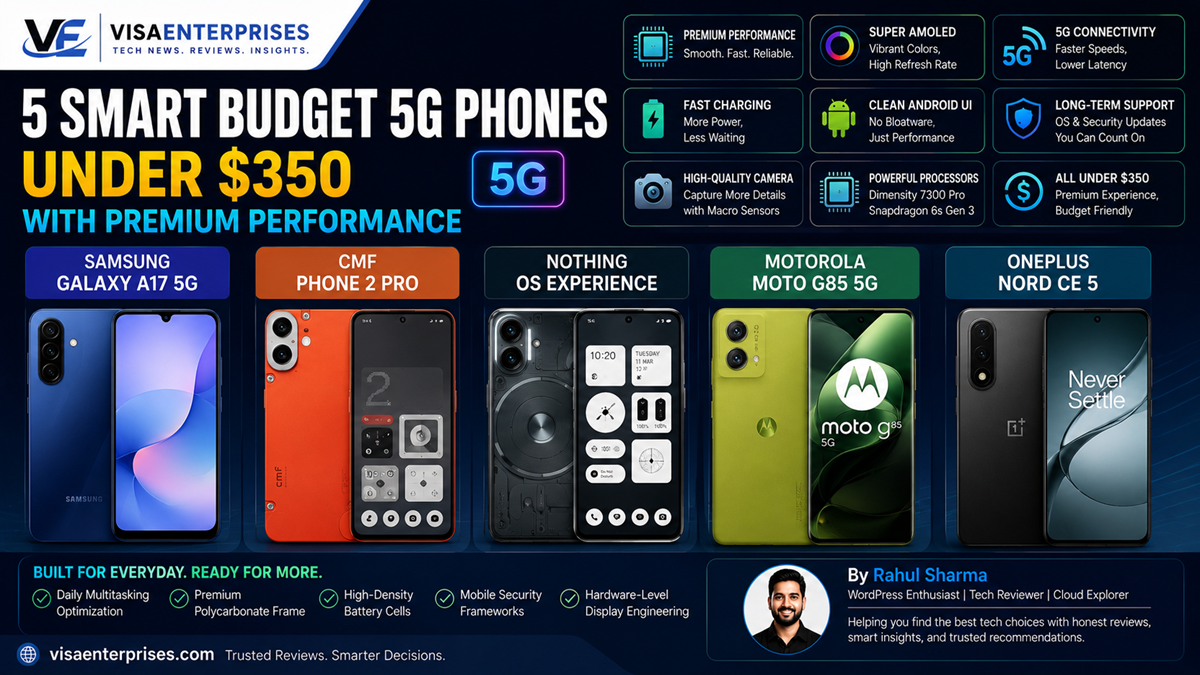
The best budget 5G phone choices under $350 break the old stereotype of cheap mobile devices by utilizing gorgeous AMOLED screens, clean operating systems, and premium matte composite frames. For users seeking an artistic design and a bloatware-free system, the CMF Phone 2 Pro stands out with its unique modular backplate design and fast MediaTek Dimensity processor. If long-term support is your core metric, the Samsung Galaxy A17 5G delivers an unbeatable six-year software update guarantee alongside a vibrant Super AMOLED panel. Alternatively, the Motorola Moto G85 5G brings an elegant curved edge profile, while the OnePlus Nord CE 5 offers exceptional AI-assisted photography features within this accessible price bracket.
Introduction
For a long time, purchasing an entry-level smartphone was an exercise in compromise. Choosing an affordable handset typically meant dealing with washed-out, dim screens, slow processors that stuttered during basic social media scrolling, fragile glossy-plastic bodies that scratched instantly, and software packages abandoned by the manufacturer within months of release. Buyers were stuck between overpaying for flagships or tolerating sluggish devices.
That baseline infrastructure has fundamentally changed. Today, the sub-$350 landscape is filled with highly optimized hardware setups that challenge expensive premium models.
By utilizing advanced, low-cost cellular chipsets, high-density battery arrays, and premium polycarbonate composites, manufacturers have elevated what an affordable device can deliver. Whether your priority is long battery endurance, crisp photography, or a bloat-free user interface, finding a highly capable budget 5G phone that feels upscale in daily use is entirely achievable. This guide highlights five outstanding options redefining value right now.
The Best Affordable 5G Contenders Under $350
Navigating modern affordable hardware requires moving past superficial specifications lists to examine real-world system optimization. A high megapixel rating or massive storage capacity means very little if the underlying operating system is bogged down by intrusive pre-installed bloatware or poor thermal management.
The top devices in this class focus heavily on clean user interfaces, robust build quality, and smooth day-to-day interactions.
1. CMF Phone 2 Pro: The Modular Aesthetic Breakthrough
Nothing’s specialized sub-brand has disrupted traditional budget design philosophies. The CMF Phone 2 Pro completely eliminates cheap-feeling glossy plastics, opting for a bold, textured matte backplate featuring interchangeable functional parts and an interactive control dial.
Driven by the efficient MediaTek Dimensity 7300 Pro chip, its unique Nothing OS delivers an incredibly smooth, fluid interface completely free of frustrating adware or duplicate applications.
2. Samsung Galaxy A17 5G: The Longevity Standard
Samsung brings unmatched security and product lifespan to the affordable market tier. The Galaxy A17 5G stands as a top budget 5G phone candidate due to its incredible software update policy: a full six years of guaranteed Android operating system upgrades and monthly security patches.
The front of the chassis features a beautiful Full HD+ Super AMOLED display that outputs rich color saturation and perfect dark contrasts that rival thousand-dollar handsets.
3. Motorola Moto G85 5G: Sleek Premium Curves
Motorola specializes in trickling high-end display engineering down to mid-tier pricing buckets. The Moto G85 5G sets itself apart by integrating an elegant, dual-curved pOLED screen border that fits naturally into the hand, minimizing side bezels.
Wrapped in a premium vegan leather rear panel option and backed by a large 5,000mAh battery cell, it offers an incredibly comfortable and premium physical experience during long workdays.
Technical Performance and Interface Refinement
Selecting an optimized budget 5G phone means matching the system’s processing capabilities with your data usage patterns. Modern sub-$350 options no longer bottleneck your download pipes; they utilize multi-band 5G modems to ensure stable, high-speed data access across modern networks.
[Raw Network 5G Signal] ──> [Optimized Transceiver Routing] ──> [Clean UI Pipeline (90Hz/120Hz)]
                                                                           │
[Fluid Screen Scrolling]  <── [UFS Fast Internal Flash Storage] <── [Efficient Mobile SOC]
Eliminating Interface Lag via High Refresh Rates
A critical factor that keeps these affordable devices feeling snappy is the adoption of 90Hz and 120Hz display refresh cycles. Higher refresh boundaries mean the display updates its visual array up to twice as fast as legacy 60Hz screens, making home screen navigation, web browsing, and animation loops feel incredibly responsive.
Fast Flash Storage Architectures
Under the hood, look for devices utilizing Universal Flash Storage (UFS) standards rather than outdated eMMC configurations. Phones like the OnePlus Nord CE 5 pair their fast cellular connections with UFS storage blocks, ensuring background application installation passes finish rapidly and large data files stream without causing system lag.
Step-by-Step Optimization for Budget Hardware
To ensure your affordable handset runs with peak responsiveness and maintains all-day battery efficiency, configure these essential system adjustments across your settings application.
1. Strip Away Unused Background Processes
Keep your system memory clear of unnecessary operational strains to ensure smooth application transitions.
- Open your core device Settings app and navigate to Apps / Application Manager.
- Sort the list by size and inspect any pre-installed carrier configurations or toolbars.
- Select non-essential background applications and tap Disable or Uninstall to remove them from system memory loops.
- Enter the app’s battery options and set the profile to Restricted to halt unprompted background wake-ups.
2. Lock Down Display Refresh Frequencies
Force your screen to maintain high-performance refresh rates to ensure a smooth, premium scrolling feel.
- Navigate back to the core configuration panel and select Display / Screen Settings.
- Open the Motion Smoothness / Refresh Rate adjustment row.
- Move the selection from Adaptive over to High / 120Hz to guarantee fluid UI rendering across all application windows.
- Note: If maximizing battery runtime over a multi-day trip is your goal, toggle this back down to Standard/60Hz.
3. Configure Network Optimization Boundaries
Set your mobile data preferences to balance high-speed data downloads with intelligent power management.
- Enter the Connections / Network & Internet directory.
- Tap into Mobile Networks and open the Preferred Network Type menu.
- Select 5G Auto / Smart 5G rather than forcing continuous 5G connection searches. This setting allows the hardware to drop back to efficient LTE bands during idle standby windows, extending battery runtime.
4. Initialize Built-In Storage Protections
Activate automatic cleaning routines to keep your storage layers running at top speeds.
- Open your device’s Device Care / Storage Management utility.
- Tap on the Auto Optimization scheduling wizard.
- Set a recurring overnight window for the system to clear out temporary cache files and reset background memory buckets without interrupting your daily usage.
Common Mistakes to Avoid with Affordable Hardware
Getting the best long-term value out of an affordable smartphone requires making informed choices around accessories and specifications at checkout.
Selecting the Lowest Available Storage Variant Without MicroSD Support
Choosing a baseline 64GB or 128GB storage model to save a few dollars upfront can lead to frustration if the device lacks expandable storage slots. System updates and social media image caches can quickly fill a small internal drive, causing write-speed slowdowns. Always prioritize buying a minimum 128GB or 256GB storage tier, or verify that the phone includes a microSD expansion slot.
Using Cheap, Low-Quality Charging Accessories
Many modern budget 5G phone alternatives omit a wall adapter from the retail box to lower production costs. Pairing your new hardware with a cheap, uncertified legacy charger can cause slow power delivery and generate excessive heat, which accelerates the chemical aging of your battery cell. Always invest in a certified Power Delivery (PD) wall brick that matches your phone’s maximum input capacity.
Expecting Premium Flagship Low-Light Camera Performance
While sub-$350 sensors capture stunning, social-media-ready images under bright daytime conditions, their smaller physical apertures mean low-light performance relies heavily on software processing. Expecting clear action shots in dark rooms can lead to blurry results. To get clean night shots, keep the phone completely steady or brace it against a surface when running the built-in Night Mode exposure cycles.
Balanced Budget Smartphone Comparison Table
The breakdown below highlights key hardware specifications and entry price points across the top affordable 5G alternatives.
| Affordable 5G Model | Built-In Chipset | Primary Display Type | Charging Profile Bounds | Software Update Commitment | Base Retail Pricing |
| CMF Phone 2 Pro | Dimensity 7300 Pro | 6.70-Inch 120Hz AMOLED | 33W Fast Data Intake | 3 Years OS / 4 Years Security | ~$279 / £230 |
| Samsung Galaxy A17 5G | Exynos 1330 Engine | 6.70-Inch 90Hz AMOLED | 25W Standard Charging | 6 Years Full OS Upgrades | ~$249 / £199 |
| Motorola Moto G85 5G | Dimensity 7025 Unit | 6.67-Inch 120Hz pOLED | 30W TurboPower Flow | 2 Years OS / 3 Years Security | ~$299 / £240 |
| OnePlus Nord CE 5 | Dimensity 8350 Apex | 6.77-Inch 120Hz AMOLED | 80W SuperVOOC Intake | 3 Years OS / 4 Years Security | ~$329 / ₹24,999 |
| Poco M8 5G | Snapdragon 6 Gen 3 | 6.77-Inch 120Hz AMOLED | 45W Rapid Power Delivery | 2 Years OS / 3 Years Security | ~$219 / ₹17,999 |
Pros and Cons of Modern Budget Hardware
Pros
- Exceptional Value Retention: Delivers 85% of a flagship phone’s daily functionality at a fraction of the total investment cost.
- Stunning Display Upgrades: The move to high-refresh AMOLED screen layers ensures deep dark levels and excellent text legibility.
- Massive Battery Arrays: Efficient mid-range chips paired with large 5,000mAh to 6,000mAh cells easily push past full-day usage markers.
- Fast 5G Connectivity: Integrated modern modems provide speedy data transfers and seamless video streaming on the move.
Cons
- Slower Secondary Cameras: Auxiliary ultra-wide or macro camera lenses capture less detail compared to the main high-quality sensor.
- Lighter Plastic Frame Builds: While rear panels look premium, internal sub-frames often utilize plastic composites instead of metal armor.
Frequently Asked Questions
What defines a budget 5G phone that doesn’t feel cheap?
It is a device priced under $350 that prioritizes premium design features, like high-refresh AMOLED screens, clean operating systems, and solid matte textures, over cheap glossy plastics.
Will a sub-$350 smartphone receive regular security updates?
Yes. Major brands have greatly improved support timelines. For instance, the Samsung Galaxy A17 5G offers an incredible six-year guarantee for complete operating system updates.
Can budget 5G phones run intense mobile games?
They handle popular titles like Battlegrounds Mobile India (BGMI) smoothly at medium graphical configurations, though they may face frame drops during long sessions on maximum graphical profiles.
Why is UFS storage critical on an affordable device?
UFS flash memory reads and writes data significantly faster than older eMMC formats, which helps eliminate system lag during app launches and file transfers.
Do budget 5G phone models include headphone jacks?
Many options in this price range, like the Motorola Moto G line, continue to offer the traditional 3.5mm headphone port, though some models have transitioned entirely to USB-C audio.
How fast do these affordable batteries recharge?
Charging speeds vary by brand. While standard options support 25W to 30W charging, standout models like the OnePlus Nord CE 5 feature blazing-fast 80W charging to fully power up in under an hour.
Can I use magnetic wireless charging accessories with these phones?
Most devices under $350 omit built-in wireless charging coils to keep costs down. However, you can easily add this functionality by using specialized magnetic cases or adapter ribbons.
Do these phones support international roaming bands?
Yes. Modern integrated 5G modems support a wide range of global sub-6 GHz network bands, though it is always smart to verify specific carrier compatibility before traveling.
What are the real-world advantages of an AMOLED screen over an LCD?
AMOLED displays control every individual pixel independently. This allows them to turn off pixels completely to produce true ink-blacks, saving power and creating much richer contrast.
How can I protect my device’s performance over several years?
Keep your internal storage below 80% capacity, run regular cache-clearing routines, use official charging bricks, and disable unused background apps from syncing.
Final Verdict
Finding a high-quality budget 5G phone under $350 no longer requires enduring a cheap, sluggish device. By selecting highly optimized models that successfully combine bright AMOLED screens, clean software interfaces, and great battery lifespans, you can enjoy a responsive mobile experience while keeping your budget perfectly intact.
For unmatched design individuality and a fast, bloatware-free interface, choose the CMF Phone 2 Pro. If long-term software support and reliability are your top priorities, opt for the dependable Samsung Galaxy A17 5G. Whichever phone lines up with your daily habits, choosing a modern mid-tier device gives you access to blazing-fast network speeds and premium performance without the steep flagship price tag.
Technical Resources and References
Internal Links
For a deeper dive into our architectural components, view our related breakdowns:
External References
Review official review breakdowns and market tracking logs directly from trusted product authorities:
- Tech Advisor Editorial Picks: https://www.techadvisor.com/article/723383/best-budget-phone.html
- MySmartPrice Performance Rankings: https://www.mysmartprice.com/mobile/pricelist/best-budget-5g-phones-price-list-in-india.html
- Uswitch Affordable Device Summaries: https://www.uswitch.com/mobiles/guides/best-budget-phones/

- 5 Smart Ecosystems: Best Smart Home Devices for Seamless Flow - June 2, 2026
- 10 Smart Choices: Top AI Productivity Tools for Workday Success - June 2, 2026
- 5 Smart Choices: Best Budget Smartwatch Models for Hitting Goals - June 2, 2026