
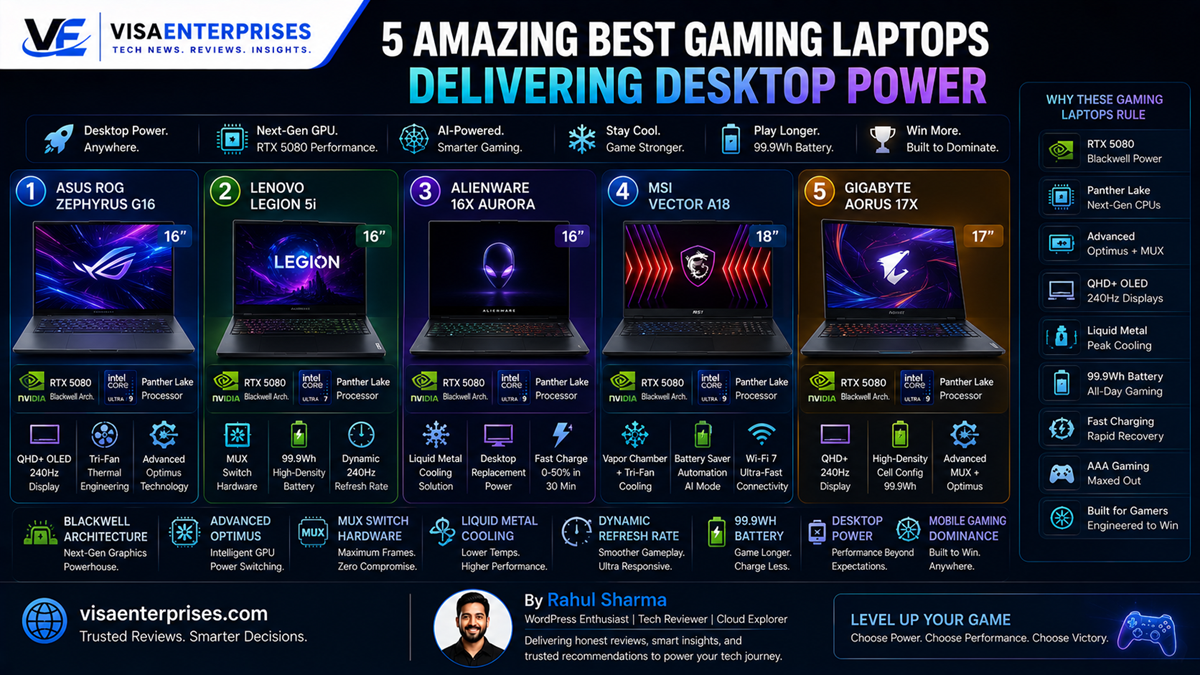
The best gaming laptops successfully close the historical performance gap by pairing desktop-class frame rates with legitimate, all-day battery endurance. Driven by next-generation graphics infrastructure like NVIDIA’s Blackwell RTX 50-Series and highly efficient multi-core processing architectures, the top options on the market no longer force you to choose between mobility and power. For the ultimate combination of premium unibody thinness and top-tier frame rates, the ASUS ROG Zephyrus G16 dominates the field, while the Lenovo Legion 5i leverages a massive 99.9Wh-capacity battery layer and Advanced Optimus automation to deliver unmatched offline endurance.
Introduction
For nearly a generation, investing in a high-performance portable gaming machine required accepting a frustrating series of technical compromises. If you wanted a machine capable of rendering demanding AAA titles at high resolution, you had to settle for a heavy, five-kilogram plastic block that ran intensely hot, generated immense fan noise, and completely lacked real portability. More frustratingly, these legacy setups suffered from abysmal battery longevity, often running completely dry within ninety minutes of leaving a wall outlet.
That era of engineering compromise has officially shattered. The arrival of highly refined system architectures and advanced graphics lithography has completely transformed what a portable machine can deliver.
Today, the best gaming laptops operate as versatile, context-aware workhorses that slide effortlessly into a travel backpack. Whether your daily routine involves rendering complex local 3D assets, compiling heavy software repositories, or diving into competitive high-refresh multiplayer matches, finding a machine that easily pushes past six hours of standard off-plug usage while delivering desktop-tier performance is entirely achievable. This guide highlights five outstanding systems setting the absolute standard for power and endurance.
Next-Gen Architectures and True Offline Endurance
Evaluating the best gaming laptops requires looking beneath aggressive exterior designs to analyze how modern silicon manages power distribution. The massive leap in performance seen in current hardware lines stems from a fundamental shift in graphics processing: the integration of NVIDIA’s Blackwell architecture and intelligent, hardware-level multiplexer (MUX) switching tools.
[AC Wall Power Mode]  ──> Full GPU TDP Allocation ──> Maximum Desktop Frame Rates
[Battery Power Mode]  ──> Advanced Optimus Switch  ──> Efficient NPU & iGPU Core Routing
The Power of Advanced Optimus Automation
Historically, gaming laptops drained their batteries quickly because the power-hungry dedicated graphics card remained active even during light tasks like writing text files or browsing web pages. The best gaming laptops eliminate this battery drain by using Advanced Optimus automation.
This smart system layout reads your active computing workload in real time. When you are editing documents, it completely disconnects the dedicated graphics card and hands system control over to the integrated processor graphics, extending your battery life instantly.
Breaking Down the 99.9Wh Battery Frontier
Because aviation regulations place a strict 100-watt-hour limit on lithium-ion batteries inside commercial aircraft, manufacturers building the best gaming laptops maximize their internal capacity right up to this legal boundary. Hardware setups like the Lenovo Legion 5i pack a massive 99.9Wh cell into their frames. When paired with smart system adjustments, these dense cells can easily push past seven hours of standard office work or deliver an impressive three to five hours of continuous, un-plugged AAA gaming.
Elite Desktop Replacements Reviewed
Navigating the premium marketplace means looking closely at how specific systems balance raw thermal limits with everyday portability. The best gaming laptops no longer rely on clunky plastic builds; they use premium aluminum-magnesium unibody frames designed for sleek professional environments and intense gaming marathons alike.
1. ASUS ROG Zephyrus G16: The Elite Thin-and-Light Standard
ASUS has established an exceptional benchmark for premium mobile gaming setups. The Zephyrus G16 packs an incredibly fast Intel Core Ultra 9 processor and an NVIDIA RTX 5080 graphics chip into a slim, CNC-machined aluminum chassis that weighs less than two kilograms.
Equipped with an advanced QHD+ 240Hz OLED display panel and a large 90Wh internal battery cell, it stands out as an incredibly well-balanced choice among the best gaming laptops for creators and enthusiasts who need professional-grade color accuracy alongside rapid frame rates.
2. Alienware 16X Aurora: Immersive High-Refresh Performance
Dell’s specialized gaming line focuses heavily on high-speed hardware stability and excellent typing comfort. The Alienware 16X Aurora pairs an elite Intel Core Ultra 9 275HX processor with an RTX 5070 graphics module, cooling its core layers with a unique liquid metal thermal paste.
The keyboard deck features tactile mechanical switches that provide an incredibly responsive typing experience, while its bright, high-contrast screen ensures stunning visual clarity during fast-paced competitive matches.
Step-by-Step Optimization for Peak Battery Life
To ensure your high-performance laptop runs with maximum system responsiveness during late-night gaming blocks while delivering exceptional battery life during your daily commute, configure these key preferences.
1. Configure the Global Graphic Delivery Architecture
Ensure your system manages its dedicated and integrated graphics processing loops efficiently to save energy when away from wall outlets.
- Right-click your desktop background and launch the NVIDIA Control Panel utility.
- Navigate to the left-hand column and select the Manage 3D Settings configuration menu.
- Locate the Preferred graphics processor drop-down selection matrix.
- Change the default rule over to Auto-select (Advanced Optimus) to allow the system to switch graphics chips automatically based on your active workload.
2. Map Automated Screen Refresh Scaling Rules
Set your high-refresh screen panel to automatically drop its refresh speed down when running on battery power to preserve cellular capacity.
- Open your core system Settings panel and select the System tab.
- Click into the Display choices directory and open the Advanced Display sub-menu.
- Locate the Choose a refresh rate selection matrix.
- Change the setting to Dynamic to allow the panel to scale smoothly down to 60Hz during text reading windows and climb back up to 240Hz during high-speed action.
3. Initialize custom Performance Mode Hotkeys
Set up your physical shortcut hotkeys to switch your fan profiles and power limits instantly based on your environment.
- Launch your pre-installed system control hub, such as the ASUS Armoury Crate or Lenovo Vantage dashboard.
- Map your preferred automated scenario profiles to a specific physical function hotkey.
- Configure the application to instantly drop down into Silent / Eco Mode whenever your system disconnects from AC wall power, ensuring quiet operation and saving energy.
4. Activate Protective Charging Limits for Desktop Setups
Enable smart battery saving configurations to protect the long-term chemical lifespan of your high-capacity battery cell.
- Enter your system configuration application and locate the Power and Battery Health directory.
- Turn on the Battery Charge Conservation Limit / Stop at 80% toggle if your laptop spends long stretches connected to a high-wattage desktop dock.
- This setting lowers thermal stress across the internal battery cells, keeping your hardware healthy and ready for long travel days away from power lines.
Common Mistakes to Avoid with High-End Gaming Laptops
Getting the absolute best long-term value out of the best gaming laptops requires making smart accessory choices and avoiding common thermal pitfalls.
Attempting to Run Demanding AAA Games Natively on Extreme Battery Saver Profiles
Forcing your system processor to run intense, high-end games while your device is locked into an eco-friendly power-saving mode will cause severe frame drops and lag. Power-saving profiles lower system voltages to maximize battery life, which starves your graphics engine of the energy it needs to render complex visual assets. Always switch your system performance profiles to Balanced or Performance mode when launching demanding titles.
Blocking the Lower Air Intake Vents on Soft Surfaces
Using your high-performance laptop directly on soft beds, plush blankets, or fabric cushions can block the lower ventilation intake strips on the bottom of the casing. Forcing the cooling system to run intense gaming sessions while resting on insulating fabrics traps heat inside, causing thermal throttling and accelerating component aging. Always prop your machine up on a solid, flat desk surface or a hard laptop stand during heavy workloads.
Using Cheap, Low-Wattage Third-Party Charging Cables
Modern high-end mobile workstations can draw anywhere from 240W to 330W of power during full desktop-grade processing cycles. Attempting to power or charge your machine using a cheap, low-wattage smartphone cable or an old legacy power adapter can cause slow charging speeds or cause the battery to slowly drain even while plugged in. Always connect your machine to the official high-wattage power brick included in the retail packaging.
Premium Gaming Laptop Performance Comparison
The data table below highlights how the best gaming laptops stack up against one another across core processing components, battery capacities, and real-world weight metrics.
| Premium Gaming Laptop Model | Installed Processor Core | Graphics Processing Engine | Built-In Battery Cell | Main Display Panel | Physical Chassis Weight |
| ASUS ROG Zephyrus G16 | Intel Core Ultra 9 | NVIDIA RTX 5080 | 90 Wh (Fast Charge) | 16.0″ QHD+ 240Hz OLED | 1.95 kg / 4.30 lbs |
| Lenovo Legion 5i | Intel Core i7-200HX | NVIDIA RTX 5060 | 99.9 Wh (Max Cap) | 16.0″ 165Hz IPS Screen | 2.30 kg / 5.07 lbs |
| Alienware 16X Aurora | Intel Core Ultra 9 | NVIDIA RTX 5070 | 90 Wh (Dual Intake) | 16.0″ 2560×1600 OLED | 2.65 kg / 5.86 lbs |
| MSI Vector A18 HX | AMD Ryzen 9 9955HX | NVIDIA RTX 5080 | 99.9 Wh (Max Cap) | 18.0″ QHD+ 240Hz IPS | 3.60 kg / 7.93 lbs |
| Acer Nitro V16 AI | AMD Ryzen 7 8845HS | NVIDIA RTX 4060 | 76 Wh (Standard) | 16.0″ 165Hz WUXGA | 2.50 kg / 5.51 lbs |
Pros and Cons of Modern Gaming Laptops
Pros
- Desktop-Grade Performance: Next-generation graphics engines deliver exceptional frame rates that easily rival large desktop computers.
- Legitimate Battery Longevity: Advanced automation tools disconnect the dedicated graphics chip during basic tasks, pushing mixed-use runtimes past seven hours.
- Breathtaking High-Contrast Screens: The move to fast OLED and high-refresh IPS panels protects eye comfort while ensuring perfect visual clarity.
- Advanced Thermal Systems: Fusing multi-fan layouts with liquid metal compound cooling allows the machine to run demanding games smoothly without throttling.
Cons
- Substantial Financial Investment: Accessing premium unibody frames and top-tier graphics processing requires a significant upfront financial commitment.
- Chunky Power Adapter Bricks: While the laptops themselves are getting thinner, the high-wattage charging bricks remain large and heavy to pack.
Frequently Asked Questions
Which model stands out as the overall best gaming laptop right now?
The ASUS ROG Zephyrus G16 claims the top spot among the best gaming laptops due to its incredibly slim unibody design, high-speed NVIDIA RTX 5080 graphics chip, and stunning 240Hz OLED screen.
How do modern gaming laptops achieve real battery life?
They utilize advanced software automation layers like Advanced Optimus to dynamically disconnect the dedicated graphics card during basic workflows, shifting tasks to the efficient integrated graphics to save power.
Can I run heavy creative and development apps on these laptops?
Yes. Thanks to their high-speed multi-core processors, ample system memory configurations, and dedicated graphics cores, these machines double as exceptionally fast mobile workstations for video editing, 3D modeling, and local AI development.
What is the advantage of a 99.9Wh battery capacity?
A 99.9Wh internal cell represents the maximum capacity legally permitted on commercial aircraft, giving the machine the largest possible energy reserve to maximize your unplugged runtime.
Do these high-performance laptop frames include traditional headphone jacks?
Yes. Even with thin unibody design trends, the best gaming laptops continue to offer the standard 3.5mm analog audio port alongside modern high-speed Thunderbolt 4 and USB-C connectivity slots.
How much internal storage space does a modern gamer require?
Given that modern AAA titles can easily exceed 100GB to 150GB in file size, configuring a minimum 1TB or 2TB high-speed NVMe SSD is highly recommended to ensure your local game library has plenty of room to expand.
What is liquid metal cooling and how does it prevent throttling?
Liquid metal is an advanced thermal interface compound that conducts heat far more efficiently than standard silicone grease, allowing the internal cooling plates to quickly draw heat away from the processor to maintain stable speeds.
What role does a physical MUX switch play on a laptop keyboard?
A hardware multiplexer (MUX) switch allows users to manually bypass the integrated graphics processing layer completely, routing data from the dedicated graphics card straight to the display panel to maximize gaming frame rates.
How can I protect my laptop screen panel from scratches inside my travel bag?
Always pack your device into a padded protective travel sleeve before placing it inside a full backpack, and verify that no hard accessories like charging blocks or cables are pressed directly against the outer casing.
What charger is required to take full advantage of fast charging features?
To quickly charge your machine from 0% up to 50% capacity in approximately 30 minutes, you must connect the device to the official high-wattage power brick included by the manufacturer in the retail box.
Final Verdict
Investing in the best gaming laptops allows power users to finally experience desktop-grade frame rates without being permanently chained to a wall outlet. By selecting mature architectures that successfully combine high-capacity 99.9Wh cells, advanced liquid metal cooling, and automated graphics switching, you can enjoy a versatile hybrid machine built for any environment.
For the absolute peak of thin unibody styling and premium graphics muscle, choose the exceptional ASUS ROG Zephyrus G16. If your daily workflow demands the longest possible battery runtime and robust frame rates, opt for the dependable Lenovo Legion 5i. Whichever machine matches your computing habits, moving to a modern high-performance laptop gives you access to an incredibly spacious digital workspace that effortlessly handles play and production alike.
Technical Resources and References
Internal Links
For a deeper dive into our architectural components, view our related breakdowns:
External References
Review official test results and hardware tracking logs directly from trusted personal computing authorities:
- TechRadar Comprehensive Reviews: https://www.techradar.com/news/mobile-computing/laptops/best-gaming-laptops-top-5-gaming-notebooks-reviewed-1258471
- Newegg Insider Longevity Metrics: https://www.newegg.com/insider/gaming-freedom-unleashed-best-gaming-laptops-that-dont-need-constant-wall-power-in-2026/
- ASUS ROG Technology Portal: https://rog.asus.com/in/articles/gaming/best-brand-for-gaming-laptop/

- 5 Smart Ecosystems: Best Smart Home Devices for Seamless Flow - June 2, 2026
- 10 Smart Choices: Top AI Productivity Tools for Workday Success - June 2, 2026
- 5 Smart Choices: Best Budget Smartwatch Models for Hitting Goals - June 2, 2026