
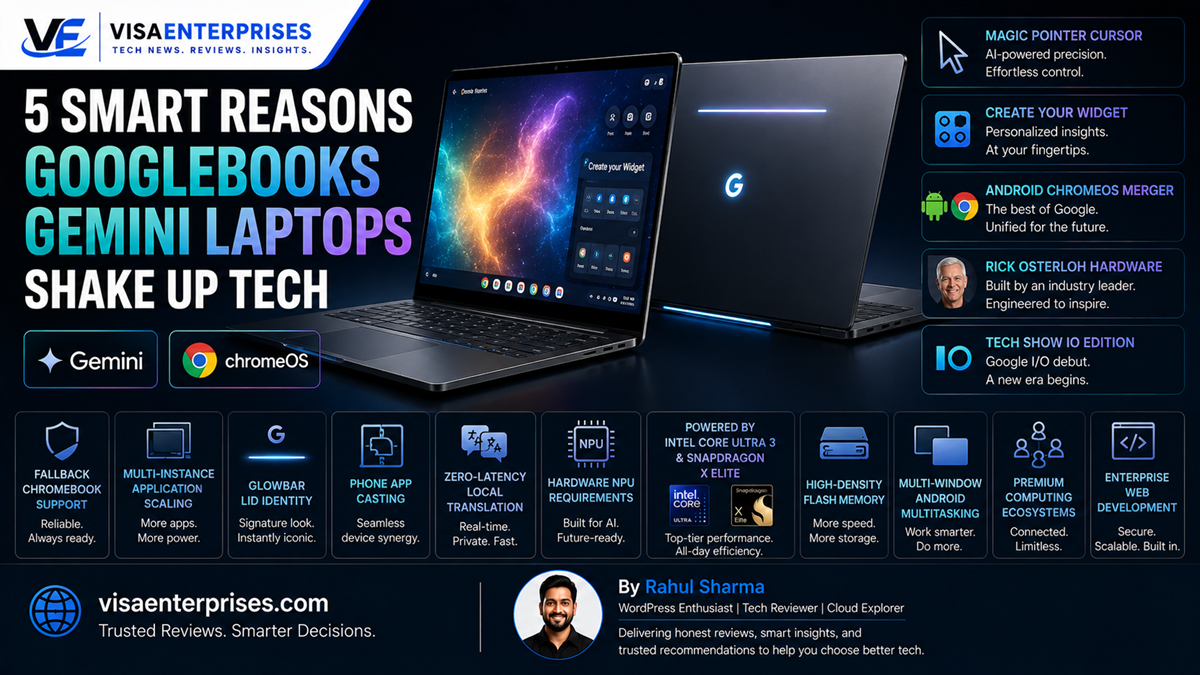
Googlebooks are Google’s newly announced premium laptop platform built from the ground up for native machine intelligence. Running a new Android-based operating system (codenamed Aluminium OS) that completely merges ChromeOS and Android, these high-end devices move beyond basic cloud computing to process AI tasks entirely on-device. Backed by hardware partners like HP, Dell, ASUS, Acer, and Lenovo, the Googlebooks Gemini integration introduces ground-breaking contextual features like a DeepMind-engineered Magic Pointer cursor and native phone app mirroring, positioning the ecosystem as a formidable rival to Apple’s dominant MacBook lineup.
Introduction
For nearly a decade, Google’s laptop strategy followed a distinct, highly successful path. By flooding schools and entry-level consumer markets with budget-friendly Chromebooks, the tech giant established a massive user base rooted in cloud-based computing. These lightweight machines were great for answering emails and typing out documents, but they completely lacked the raw processing power, high-end materials, and offline capabilities needed to compete with premium laptops like the Apple MacBook.
That entry-level blueprint has officially changed. At a recent hardware event, Google unveiled a radical shift in its personal computing architecture.
The launch of the Googlebooks Gemini platform marks a bold transition away from simple web browsers and toward highly advanced, on-device intelligence. By merging its operating systems and imposing strict hardware guidelines, Google is preparing an aggressive push into the premium tier of the computer market. This deep dive looks at the hardware changes, AI features, and system optimizations that define this next-generation laptop framework.
The Android-ChromeOS Merger: Inside Aluminium OS
To understand the technical foundation of the Googlebooks Gemini ecosystem, you have to look directly at the underlying software shift. For years, running Android applications on top of ChromeOS felt like a clunky patch; it required a heavy, power-hungry subsystem layer that slowed down file transfers and quickly drained laptop batteries.
The Googlebooks Gemini standard completely eliminates this friction by replacing the old ChromeOS core with a unified, high-performance Android architecture.
[Old Chromebook Layout]  ──> ChromeOS Base ──> Subsystem Emulator Layer ──> Android Apps (Slow)
[New Googlebook Pattern] ──> Native Android Core (Aluminium OS) ──> Zero-Lag Local App Execution
Premium Hardware Partnerships and Performance
Google isn’t relying on a single reference design to establish this new category. Instead, it has enforced strict hardware standards across top global manufacturers—including Dell, HP, ASUS, Acer, and Lenovo—to guarantee a premium experience.
These high-end machines feature aluminum unibody designs and are powered by advanced processors like Intel’s Core Ultra series 3, AMD’s Ryzen AI lines, and Qualcomm’s energy-efficient Snapdragon chips. Every certified model also includes a signature “glowbar” multi-colored light strip across the exterior lid, providing a clear visual identity.
DeepMind Co-Developed System Control
The standout software innovation in the Googlebooks Gemini framework is the Magic Pointer cursor control system. Developed in close collaboration with Google DeepMind, the mouse cursor is no longer just a passive selector tool; it works as an active layer of on-device context analysis:
- Context-Aware Interactions: Wiggling or hovering the cursor over an on-screen element, such as a date inside a long email or an image block, prompts Gemini to offer immediate, relevant actions.
- Automated Scheduling Hooks: The system reads context clues locally to let you schedule calendar invites or add tasks without ever copying and pasting text between separate app windows.
- Generative Desktop Construction: The platform introduces a “Create your Widget” utility, allowing you to build an entire custom desktop dashboard by typing out natural language design descriptions.
Direct Ecosystem Integration vs. Apple’s Ecosystem
The primary target for the Googlebooks Gemini lineup is the Apple MacBook unibody empire. For years, Apple held an unmatched advantage by providing seamless integration between iPhones and Macs, allowing users to share text mid-sentence, paste images across devices, and take phone calls directly from their desktop.
The new Googlebook standard challenges this dominance by building deep, hardware-level cross-device hooks directly into the Android core.
True Shared Application Streaming
Instead of relying on slow file transfers or complex Bluetooth pairing menus, a Googlebook links directly to your smartphone to let you cast and control individual phone applications inside fluid desktop windows.
You can interact with your phone’s apps, manage files, and type out responses using your laptop’s physical keyboard and trackpad, all while your mobile device rests securely inside your pocket or backpack.
Native Localized Processing Efficiency
By forcing all certified hardware configurations to include powerful, high-performance Neural Processing Units (NPUs) and a minimum of 12GB to 16GB of high-speed system memory, Google avoids the response delays typical of cloud-assisted tools. The laptop executes translation tasks, code optimization reviews, and file summaries locally on your chip, lowering data consumption and keeping your personal data safely locked behind local security protocols.
Step-by-Step Optimization for Googlebook Platforms
As development models arrive ahead of the fall consumer launch window, software engineers can optimize their large-screen Android application layouts by following this structured configuration workflow inside Android Studio.
1. Initialize the Desktop Environment Workspace
Set up your local engineering stack to test your adaptive user interfaces against multi-window, resizable desktop parameters.
- Download and install the latest Android Studio Canary build onto your development machine.
- Open the SDK Manager and download the specialized Desktop Emulator System Image package.
- Launch the Virtual Device Manager and create a new emulator profile using the customized Googlebook hardware preset.
- Run the virtual machine to verify that your layout adapts correctly to a standard 16:10 aspect ratio computer display.
2. Configure Dynamic Window Multi-Instance Scaling
Ensure your application can launch multiple separate instances simultaneously, allowing users to compare files side by side easily.
- Open your core project repository and locate your application configuration file.
- Deploy the code changes to your local emulator to confirm that dragging your application windows triggers fluid, clean layout scaling.
3. Implement Universal Input Precision Maps
Map out your software control layers to support keyboard shortcuts, mouse clicks, and precision trackpad gestures flawlessly.
- Open your event handling modules and configure custom hover listener blocks to change cursor icons dynamically when tracking across text or buttons.
- Add standard physical keyboard shortcuts (like
Ctrl + CandCtrl + V) into your data tables. - Use the integrated AI Skills Developer Tool inside Android Studio to automatically scan your code and flag any non-responsive button layouts before submission.
Common Implementation Mistakes to Avoid
Successfully transitioning your workflows to this next-generation laptop platform requires understanding its new architectural rules.
Expecting Legacy ChromeOS Extensions to Run Natively
Because the system moves away from a ChromeOS core to run entirely on a native Android stack, trying to install old, legacy browser utilities or background extension scripts can cause compatibility issues. Always look for native, large-screen optimized alternatives inside the Google Play Store to ensure smooth performance.
Forcing Mobile Aspect Ratios on Large Displays
Leaving your application layouts locked to narrow, vertical smartphone boxes on an 11-inch or 15-inch display panel looks unpolished and wastes valuable screen real estate. Always utilize responsive design tools like Jetpack Compose to allow your user interfaces to expand into columns, providing a high information density layout for power users.
Disabling On-Device AI Tool Components
Turning off the background tracking tools or restricting NPU resource access out of general battery anxieties will disable core platform features like the Magic Pointer cursor. The system chip is engineered to run these predictive model loops with exceptionally low power draw, so keeping them active is key to experiencing the full power of the platform.
Personal Computing Platform Matrix
The comparison table below details the structural variations between legacy Chromebooks, Microsoft’s Copilot+ PCs, and the new Googlebook platform.
| Platform Characteristic | Traditional Cloud Chromebooks | Windows 11 Copilot+ PCs | Upcoming Googlebook Flagships |
| Core Operating System | Linux-based ChromeOS Base | Microsoft Windows 11 Code | Unified Android Base (Aluminium) |
| Primary System Focus | Cloud Applications & Browsing | Desktop Workstations & AI | On-Device Gemini Intelligence |
| Application Layer | Web Apps & Virtual Emulators | Native x86 / Arm Applications | Native Android Play Store Suite |
| Context Control Engine | Standalone Assistant Prompts | Windows Copilot Sidebar | DeepMind Magic Pointer Cursor |
| Cross-Device Phone Hooks | Basic Bluetooth Text Mirroring | Phone Link Tool Configurations | Direct Native App Casting & Feeds |
| Initial Hardware Tier | Budget to Mid-Range Models | Mid-Range to Ultra-Premium | Super-Premium Flagships Only |
Pros and Cons of the New Googlebook Framework
Pros
- Blazing-Fast Local Responses: The built-in NPU chips process text translation and image generation tasks locally with near-zero latency.
- Incredibly Useful AI Cursor: The DeepMind Magic Pointer turns your mouse cursor into an active, context-aware tool that saves time across every application.
- Massive Native App Library: Access millions of Google Play applications natively with full file system access and zero emulation lag.
- Deep Android Ecosystem Integration: Cast and run full mobile phone apps on your laptop screen without dealing with slow file transfers.
- Long-Term Support Reassurance: Natively co-exists alongside traditional Chromebooks, preserving a 10-year support window for older school hardware.
Cons
- Higher Price of Entry: Early flagships launch exclusively at premium price points, abandoning the budget focus of early Chromebooks.
- Ecosystem Shift: Requires switching away from legacy browser plugins in favor of modern Android applications.
Frequently Asked Questions
What is the Googlebooks Gemini platform?
It is a newly announced category of premium laptops running a unified Android-based operating system designed to execute advanced Gemini AI features completely on-device.
Are traditional Chromebooks being discontinued because of Googlebooks?
No. Google officially confirmed that Chromebooks will continue to serve as a separate, budget-friendly option for schools and casual use, maintaining their full 10-year update windows.
How does the new Magic Pointer cursor function?
Co-developed with DeepMind, the Magic Pointer reads on-screen text and images in real time to offer instant, context-aware action shortcuts like creating a calendar invite straight from an email date.
Which manufacturers are building these new laptops?
Launch partners include top global computer manufacturers like Acer, ASUS, Dell, HP, and Lenovo, using high-speed system chips from Intel, Qualcomm, and MediaTek.
Can I run standard Android applications on a Googlebook?
Yes. Because the platform runs directly on a native Android tech stack, all Google Play applications run natively with full file system access and zero emulation lag.
What is the purpose of the “glowbar” on the laptop lid?
The glowbar is a multi-colored LED light strip built into the exterior lid that displays Google’s signature color palette, serving as the visual identifier for this new device category.
When will the first Googlebook laptops be available for purchase?
The first wave of premium laptops is scheduled to launch globally this fall, with rolling product announcements expected between September and November.
Does the platform support integration with Apple iPhones?
Early system builds include a “Link to iOS” tool configuration, suggesting Google intends to offer helpful cross-device options for iPhone users alongside its deep Android integration.
What is the starting price point for these new laptops?
The initial wave of devices will target the premium market to challenge high-end MacBooks, with pricing expected to start around Rs. 65,000 / $800+ before scaling higher.
Can older Chromebooks update to this new operating system?
Google has stated that certain high-end, eligible Chromebook Plus models may receive a firmware upgrade path to experience the new system features post-launch.
Final Verdict
The arrival of the Googlebooks Gemini platform signals a major evolutionary step in personal computing design. By moving past the cloud-only limitations of traditional ChromeOS and building a unified, high-performance Android core, Google has created a system designed to counter both Apple MacBooks and Microsoft Copilot+ PCs. The addition of clever, context-aware features like the DeepMind Magic Pointer and seamless mobile app casting proves that this framework is built to maximize daily efficiency.
While the higher entry price points and shift away from legacy browser plugins require a minor adjustment from traditional users, the massive jump in on-device processing power and exceptional ecosystem integration make it a stellar development. For any professional, student, or creator looking for a secure, future-proof laptop that effortlessly blends phone accessibility with advanced AI tools, the Googlebook platform is a highly promising option that points directly toward the future of mobile productivity.
Technical Resources and References
Internal Links
For a deeper dive into our architectural components, view our related breakdowns:
External References
Review official announcements and technical platform logs directly from primary authorities:
- Wired Magazine In-Depth Report: https://www.wired.com/story/googlebook-android-chromeos-gemini-laptop/
- Android Developers Platform Hub: https://developer.android.com/googlebook
- The Verge Product Analysis: https://www.theverge.com/2026/5/12/googlebook-announcement-chromebook-successor

- 5 Smart Ecosystems: Best Smart Home Devices for Seamless Flow - June 2, 2026
- 10 Smart Choices: Top AI Productivity Tools for Workday Success - June 2, 2026
- 5 Smart Choices: Best Budget Smartwatch Models for Hitting Goals - June 2, 2026